Best Computer for Home Recording
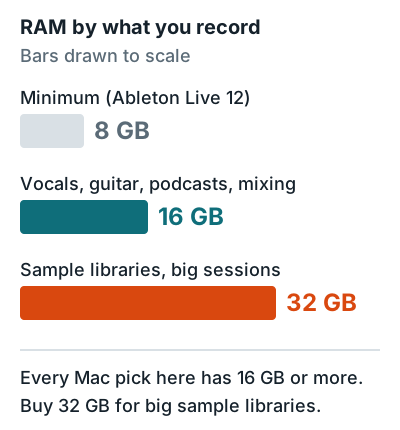
The best computer for most home recording studios is a Mac mini with 16 GB of memory and a 512 GB SSD, or a Windows PC with an Intel Core i7 or AMD Ryzen 7, 16 to 32 GB of RAM, and an NVMe SSD. Ableton's computer specifications for Live set the floor at 8 GB of RAM and recommend 16 GB for typical music production, with an SSD for the system drive.
If you already own something close to that, use it. A faster computer won't make your recordings sound better. It just lets you run more tracks and plugins before things start crackling.
Quick picks
Five computers cover home recording, from a vocal booth to a sample-heavy production rig.
| Pick | Best for | Key spec | Price band |
|---|---|---|---|
| Mac mini (M6, 16 GB, 512 GB) | Most home studios | 3 Thunderbolt 4 + 2 USB-C | $700 to $1,000 |
| MacBook Air 13 (M5, 16 GB, 512 GB) | Recording in more than one room | 2 Thunderbolt 4, headphone jack | $1,000 to $1,400 |
| Mac mini (M5 Pro, 24 GB) | Big mixes, sample libraries | 15-core CPU, up to 64 GB | $1,300 to $1,800 |
| MacBook Pro 14 (M5 Pro, 24 GB, 1 TB) | Pro sessions on the move | 3 Thunderbolt 5, up to 64 GB | $2,000 to $2,700 |
| Windows desktop build | FL Studio users, most RAM per dollar | Core i7 or Ryzen 7, 32 GB | $900 to $1,500 |
Minimum specs by use case
For any home recording computer, buy at least 16 GB of RAM, a 512 GB SSD, and a recent CPU with 6 or more cores. Ableton recommends an Intel Core i7 or i9 (8th generation or later), AMD Ryzen 7 or 9, or any Apple silicon chip, and says 6 or more cores help on large projects.
| Use case | CPU | RAM | SSD |
|---|---|---|---|
| Vocals, guitar, podcasts | Apple M-series, Core i5 or Ryzen 5 | 16 GB | 512 GB |
| Multitrack recording and mixing | 6+ cores, Core i7 or Ryzen 7 | 16 to 32 GB | 1 TB |
| Sample libraries, orchestral, big sessions | 8+ cores, M5 Pro, Core i9 or Ryzen 9 | 32 GB or more | 1 TB plus an external SSD |
The CPU does all the audio processing, so it sets how many tracks and plugins you can run. Ableton notes that on Apple silicon, Live runs real-time audio on the performance cores only. That's why the M5 Pro's 15 fast cores matter more than the M6's 12-core total, which includes 6 efficiency cores.
Mac vs PC for home recording
Both run every major DAW except Logic Pro and GarageBand, which are Mac only. The bigger trap on Windows is an Arm laptop. Intel and AMD PCs run everything, and Arm PCs don't yet.
| Mac (Apple silicon) | Windows PC (Intel or AMD) | Windows on Arm | |
|---|---|---|---|
| Logic Pro, GarageBand | Yes | No | No |
| REAPER | Yes | Yes | Beta build only |
| FL Studio | Yes | Yes | Not supported |
| Ableton Live 12 | Yes | Yes (Intel or AMD with AVX2) | Not listed |
| Focusrite USB interfaces | Yes | Yes | Yes |
| Thunderbolt interfaces | Yes | On Thunderbolt PCs | Not supported |
Logic Pro needs a Mac with Apple silicon and macOS 15.6 or later, and it costs $199.99 one time, per Apple's Logic Pro specs. REAPER ships a Universal build for Intel and Apple silicon Macs, plus a Windows Arm64 build marked beta. For DAW picks on either platform, see the best DAW for beginners.
The 5 best computers for home recording
Every Mac pick is current on Apple's site, with specs from Apple's spec pages. The Windows pick is a spec target rather than one model, so you can buy it from any builder.
Mac mini (M6, 16 GB, 512 GB)
For most home studios: one desk, one interface, one pair of monitors.
- An Apple M6 chip with a 12-core CPU, per Apple's Mac mini specs
- 16 GB of memory base, up to 32 GB
- 3 Thunderbolt 4 ports, 2 front USB-C ports, HDMI, Ethernet, and a 3.5 mm headphone jack
- The base model has 256 GB of storage, so buy the 512 GB configuration
The catch: memory tops out at 32 GB, so heavy sample library users should start at the M5 Pro model.
Price band: $700 to $1,000.
MacBook Air 13 (M5, 16 GB, 512 GB)
For anyone who records in a bedroom, a rehearsal room, and on the road.
- An Apple M5 chip with a 10-core CPU, per Apple's MacBook Air specs
- 16 GB of memory base, up to 32 GB
- 512 GB of storage base
- 2 Thunderbolt 4 (USB-C) ports, MagSafe, and a headphone jack
With two Thunderbolt ports, the interface takes one and a drive or MIDI keyboard takes the other. Anything more means a hub.
Price band: $1,000 to $1,400.
Mac mini (M5 Pro, 24 GB)
For producers leaning on sample libraries, virtual drums, and long plugin chains.
- An Apple M5 Pro chip with a 15-core CPU (configurable to 18), per Apple's Mac mini specs
- 24 GB of memory base, up to 64 GB
- 512 GB of storage base, up to 8 TB
- 3 Thunderbolt 5 ports and 2 front USB-C ports
It's a desktop only. Unlike the laptops here, you'll need a screen, keyboard, and mouse.
Price band: $1,300 to $1,800.
MacBook Pro 14 (M5 Pro, 24 GB, 1 TB)
For pro-level sessions that also travel to other rooms or studios.
- An Apple M5 Pro chip with a 15-core or 18-core CPU, per Apple's MacBook Pro specs
- 24 GB of memory base, up to 64 GB
- 1 TB of storage base
- 3 Thunderbolt 5 ports, HDMI, SDXC, MagSafe, and a headphone jack
It's in the highest price band here. If you don't need to move it, a Mac mini M5 Pro has the same chip in a lower price band.
Price band: $2,000 to $2,700.
Windows desktop build
For FL Studio users, Windows-only plugin libraries, or anyone who wants to add RAM and drives later.
- An Intel Core i7 or AMD Ryzen 7 or better, Ableton's recommended tier
- 32 GB of memory, the level Ableton recommends for large projects
- A 1 TB NVMe SSD for the system, plus a second SSD for samples
- An Intel or AMD (x86) platform, not Arm, so every DAW and interface driver runs natively
The catch: you choose every part, so check that the motherboard has the USB-C or Thunderbolt ports your interface uses.
Price band: $900 to $1,500.
How much storage you need
Buy a 512 GB SSD at minimum, and 1 TB if you use sample libraries. On Apple silicon, Ableton lists 10 GB for Live 12, up to 76 GB for optional sound content, and at least 10 percent of the system drive kept free for caching.
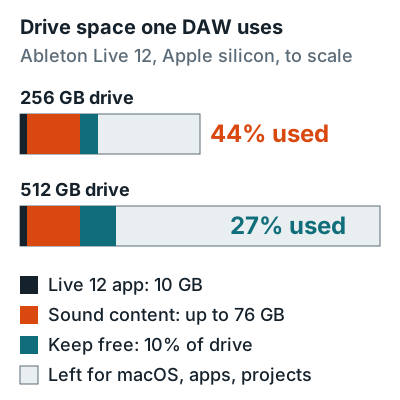
Ableton recommends an SSD for the system drive and an external SSD or fast drive for recordings and sample libraries, because fast storage prevents dropouts when streaming samples. On a Mac, that means an external SSD on a spare Thunderbolt or USB-C port for your sample libraries.
Next, plug in your interface with how to connect an audio interface to a computer, or see the rest of the home recording studio equipment list.
FAQ
How much RAM do I need for music production?
16 GB for typical recording and mixing, which is Ableton's recommendation for Live 12. Ableton's minimum is 8 GB, and it recommends 32 GB or more for large projects with big sample libraries.
Is a Mac or PC better for home recording?
Both work with every major DAW except Logic Pro and GarageBand, which are Mac only. Pick a Mac if you want Logic. Pick an Intel or AMD Windows PC if you want more RAM and storage for the money.
Can I record on a Windows on Arm laptop?
With care. Focusrite's USB drivers support Windows on Arm, but Thunderbolt interfaces don't work, FL Studio doesn't support Arm on Windows, and REAPER's Arm build is still a beta.
Is 256 GB enough storage for music production?
Not for long. Ableton Live 12 can take 10 GB plus up to 76 GB of sound content on a Mac, and Ableton asks for 10 percent of the drive free, which is 44 percent of a 256 GB drive before your projects.
Is a laptop good enough for home recording?
Yes. A MacBook Air M5 with 16 GB and 512 GB meets Ableton's recommended 16 GB and SSD for typical production. Pick a desktop like the Mac mini if you want more ports: it has 5 Thunderbolt and USB-C ports to the Air's 2.