How to Record Guitar in FL Studio
To record guitar in FL Studio, plug into your interface's instrument input, route it to an empty Mixer track from the Mono list, and set the pickup to EXT. Then arm the track and hit Record and Play. Fruity Edition won't do it: Image-Line's edition comparison lists audio recording as "Producer Edition and up."
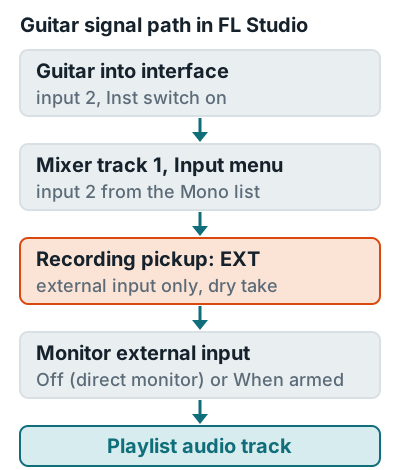
Steps
These steps come straight from Image-Line's recording audio manual page.
- Connect the guitar. Use the instrument (Hi-Z) input and flip on the Inst switch if your interface has one. Cable and level details are in how to connect a guitar to an audio interface.
- Choose the driver. Press F10, open Audio, and select your interface's own ASIO driver on Windows. On a Mac, give FL Studio microphone access in macOS privacy settings.
- Pick an empty Mixer track. Never the Master, since the whole project runs through it.
- Route the input. Open the Mixer track's Input menu and choose the guitar's input from the lower Mono list. Picking an input auto-arms the track.
- Set the pickup to EXT. Click the selector in front of the Input menu and choose External input only (EXT).
- Set monitoring. In Monitor external input, choose Off if your interface handles direct monitoring, or When armed to hear FL Studio effects like an amp sim.
- Send it to the Playlist. Right-click the Mixer track and choose Assign to new audio track(s).
- Record. Right-click Record and make sure Audio is checked. Left-click Record so it turns orange, press Play, then Stop.
Set interface gain so your hardest strums peak around minus 12 dBFS (see gain staging). Then turn on Latency compensation in the Mixer menu's Disk Recording submenu, so your takes line up with the beat. Vocals use the same routing in how to record vocals in FL Studio, and the bigger picture is in how to record music at home.
Related questions
Why is my guitar only in one speaker in FL Studio?
You chose a stereo input pair, and the guitar is on one side of it. Pick the guitar's input from the lower Mono list in the Mixer track's Input menu so it plays in both speakers.
Can I record guitar in FL Studio Fruity Edition?
No. Image-Line lists audio recording as Producer Edition and up, so Fruity Edition can't record a guitar from an interface.
How do I record guitar with amp sim effects in FL Studio?
Record with the pickup on EXT so the take stays dry, then load the amp sim on the Mixer track. You hear the effect while playing and can swap the amp later.
More answers: Home recording FAQ