Home Voice Over Studio Setup
A home voice over or dubbing studio setup starts with the noise floor: when you're silent, the room has to measure minus 60 dB RMS or lower, the limit ACX sets for audiobook files. You get there with a small, dead space like a clothes closet, a cardioid mic 3 to 12 inches away, and closed-back headphones. For dubbing, add a screen and a DAW that plays video, and record at 48 kHz, 24-bit.
The targets casting sites and platforms set
ACX is the only voice platform here that publishes a number for the noise floor. Casting sites like Voices.com judge noise and room sound by ear. Build to ACX's limit and you clear both.
| Who | Requirement | Source |
|---|---|---|
| ACX (audiobooks) | Noise floor minus 60 dB RMS or lower | ACX requirements |
| ACX | Average level minus 23 to minus 18 dB RMS, peaks no higher than minus 3 dB | ACX requirements |
| ACX | 192 kbps or higher CBR MP3 at 44.1 kHz, 1 to 5 seconds of room tone at each end | ACX requirements |
| Voices.com (casting) | Normalize auditions to minus 1 dB; "audible room reflections" are not competitive | Voices.com audition guide |
| Netflix (dubbing) | Dialogue stems at 48 kHz, 24-bit WAV | Netflix dubbing specs |
Pick and treat the space
The best home voice over space is the smallest one full of soft stuff, with nothing running. Neumann's home studio guide says "an open wardrobe filled with clothes can serve as a large absorber," and warns that the mic can pick up fan noise.
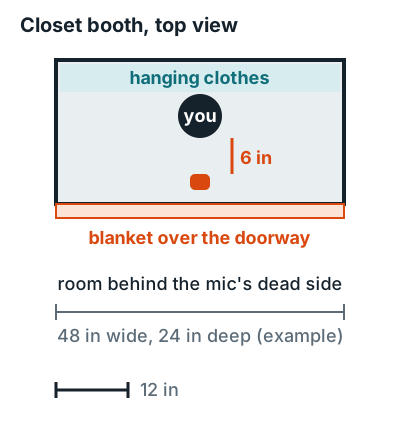
- Choose a closet or your smallest room, away from the street and the appliances.
- Stand with your back to the clothes, so the cardioid mic faces them.
- Hang a heavy blanket across the opening behind the mic.
- Cover any bare wall near your head with absorption; build options are on vocal booths and how to build a vocal booth.
No closet? A portable vocal booth around the mic cuts reflections, though it won't stop outside noise.
Gear for a home voice over studio
You need a mic, an interface, closed-back headphones, and a DAW. Voices.com suggests a mic in "the range of $100-150 USD as a minimum threshold for quality."
Mic
Dynamic or condenser
A dynamic worked up close suits an untreated room; a condenser suits a treated booth. Picks: best microphone for voice recording.
Interface
60+ dB gain
Shure says the SM7B needs more than 60 dB; the Scarlett 2i2 4th Gen has 69 dB. More: best audio interface.
Headphones
Closed-back
They keep the guide track from bleeding into the mic. Picks: best closed-back studio headphones.
DAW
Plays video
You'll need this for dubbing. REAPER mixes audio, MIDI, and video on any track. Free options: best free DAW.
Measure your noise floor
Measure the noise floor by recording silence in your booth and reading its RMS level. Do it at the same gain you'll use for your voice.
- Set your gain so a normal read peaks below minus 3 dB.
- Record 5 seconds of silence with everything in the house that runs during a session switched on.
- Measure it. The ACX Check plugin for Audacity reports the noise floor as the RMS of the quietest 500 ms, next to your peak and RMS levels.
- Check the gap. Audacity's Contrast tool (Analyze, Contrast) measures the RMS difference between a voice selection and a silent one.
How to lower the noise floor
Shure names the usual suspects when it describes the SM7B's bass rolloff: A/C, HVAC, and traffic. Fix the source first, then the mic setup.
Kill the hum
Turn off the HVAC and fans for each take, and switch on your mic's bass rolloff if it has one; on the SM7B it "can help lower background hum."
Work closer
Shure's SM7B guide puts you 1 to 6 inches from the mic, which rejects off-axis noise and lets you run less gain.
Block the gap
Seal the door with the blanket, record when the street is quiet, and keep the computer outside the closet.
If outside noise still gets in, that's a soundproofing job, not a treatment one; see how to soundproof a room from outside noise.
Dubbing studio setup
A dubbing setup adds picture to the voice over booth. A screen near the mic shows the video, the DAW plays the guide audio into your headphones, and you record each line in sync.
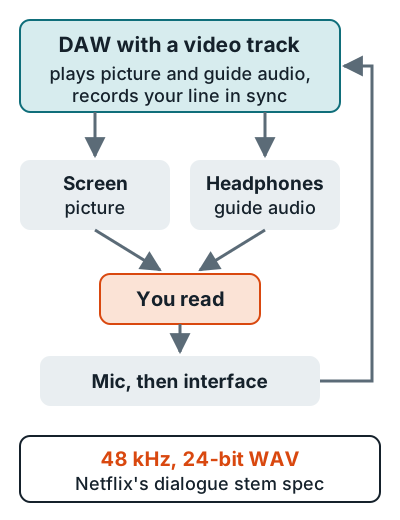
Record at 48 kHz, 24-bit from the start: Netflix asks for dialogue stems "at 48 kHz/24 bit" as discrete WAV files. Sync matters as much as sound. Netflix's dub QC overview rates "noticeable sync issues" as Blocker-level.
For podcast setups and two-host gear, head back to how to set up a podcast studio at home. The short version of the voice workflow is on the best way to record a voice over at home.
FAQ
What noise floor do I need for voice over work?
Minus 60 dB RMS or lower. That's ACX's published limit for audiobooks; Voices.com publishes no number but says clients don't expect to hear room or background noise.
What do I need for a home dubbing studio?
A quiet treated space, a mic, an audio interface, closed-back headphones, a screen for the picture, and a DAW that plays video, such as REAPER. Record at 48 kHz, 24-bit.
How far should I be from the mic for voice over?
Voices.com puts it at about 3 to 12 inches depending on your room and voice. With a dynamic like the Shure SM7B, Shure says 1 to 6 inches.
How do I measure my noise floor?
Record 5 seconds of silence and measure its RMS level. The ACX Check plugin for Audacity reports the noise floor as the RMS of the quietest 500 milliseconds.
Can I record voice over in a closet?
Yes. Stand with your back to the hanging clothes so the mic faces them, and hang a heavy blanket across the doorway behind the mic.