XLR vs USB Microphone
Choose a USB microphone if you record one voice at a time into a laptop, and an XLR microphone if you'll ever record two sources at once or want to upgrade the preamp later. A USB-only mic costs less up front, but switching to XLR later costs about $169 more in total than starting with XLR (listed prices below).
Sound won't decide this. Count how many sources you'll record at once.
XLR vs USB compared
The capsule can be identical. What changes is where the preamp and converter live.
| USB mic | XLR mic | |
|---|---|---|
| Connects to | Computer, some tablets and phones | Audio interface or mixer |
| Preamp and converter | Built into the mic | In the interface |
| Gear to start | Mic, computer, headphones | Mic, interface, XLR cable, headphones |
| Example resolution | AT2020USB-X: up to 24-bit, 96 kHz | Scarlett Solo: up to 24-bit, 192 kHz |
| Recording 2+ mics | Limited, software dependent | Interface with enough inputs |
| Upgrade path | Fixed, "locked to this setup" | Swap mic or interface separately |
| Condenser power | From USB | 48 V phantom from the interface |
RØDE's XLR vs USB guide calls the interface "the key difference" and says a USB setup leaves you "essentially locked to this setup," while XLR lets you mix and match. Resolution figures are from Audio-Technica's AT2020USB-X page and Focusrite's Scarlett Solo page.
How the signal chain differs
A USB mic puts the preamp and analog-to-digital converter inside the mic body, so one cable carries digital audio to the computer. An XLR mic sends analog audio down the cable, and the interface handles the gain, phantom power, and conversion.
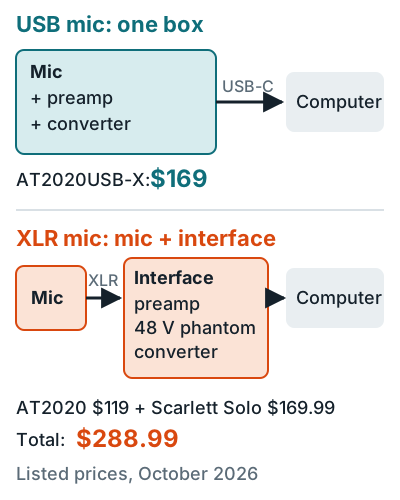
Go the XLR route with a condenser and you'll need phantom power. The AT2020 draws 48 V DC at 2 mA, supplied by the interface. What the 48 V switch does is in what does 48V do on an audio interface, and what the box itself does is in what is an audio interface.
Upgrade path cost math
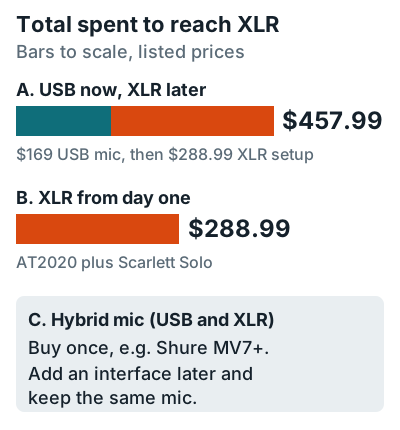
Starting on USB and moving to XLR later costs more than starting with XLR, because the USB mic is left over. Here's the math with Audio-Technica and Focusrite listed prices at the time of writing:
USB now
$169
AT2020USB-X, one box, no interface.
XLR day one
$288.99
AT2020 at $119 plus a Scarlett Solo at $169.99.
USB, then XLR
$457.99
The $169 USB mic is left over once you switch.
If you sing while you play guitar, you already have two sources. Cheaper interfaces that keep the XLR total down are in best audio interface under $150.
Hybrid mics: USB and XLR in one
A hybrid mic has both outputs, so it works on a laptop now and on an interface later. It's the hedge if you can't decide. Two current examples:
Shure MV7+
Dynamic
USB-C at 24-bit, 48 kHz with 0 to 36 dB of built-in gain, plus a passive XLR output, per the MV7+ user guide.
RØDE NT1 5th Gen
Condenser
XLR and USB "Dual Connect," with what RØDE calls a "world-first 32-bit float digital output."
Shure notes that the MV7+'s XLR audio "is not affected by software settings," so its onboard processing applies over USB only. Both mics get the singer's-eye review on best microphone for recording vocals.
Which one to buy
Pick by what you record, not by which one sounds better. RØDE says USB mics "sound great" and that all you need is "the mic itself, a computer, and a pair of headphones."
- If you record one voice into a laptop, for a podcast or demos, go USB. Picks are in best microphone for voice and podcast recording.
- If you record two or more sources at once, go XLR. A stereo guitar, or a singer playing guitar, needs an interface with two inputs, like the two-preamp Scarlett 2i2.
- If you're not sure yet, get a hybrid mic, so the mic survives the upgrade.
- If you already own an XLR mic but no interface, see how to use an XLR mic without an audio interface.
Whether USB is good enough for singing is answered in are USB mics good for recording vocals, and dynamic or condenser is a separate choice covered in condenser vs dynamic microphone. Every pick is in the microphones for home recording hub.
FAQ
Do USB mics sound worse than XLR mics?
Not by default. The AT2020USB-X records up to 24-bit, 96 kHz and the RØDE NT1 5th Gen offers 32-bit float over USB. The difference is flexibility, not sound.
Can I plug an XLR mic straight into my computer?
No. An XLR mic sends an analog signal that needs a preamp and converter, which an audio interface or mixer provides.
Can I record two USB mics at once?
Sometimes. RØDE says its RØDE Connect software records several of its USB mics on one computer, but in general, two or more mics is the job of an XLR interface with enough inputs.
What is a hybrid USB and XLR mic?
A mic with both outputs, like the Shure MV7+ or RØDE NT1 5th Gen. Use USB now and the XLR output with an interface later, without buying a new mic.