Best DAW for Beginners
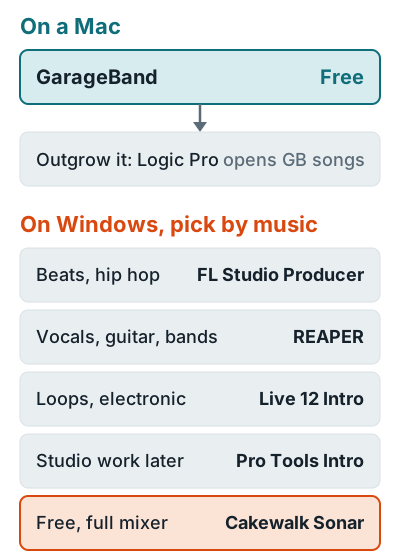
The best DAW for beginners is GarageBand if you own a Mac: it's free and holds up to 255 audio tracks. On Windows, pick FL Studio Producer for beats, REAPER for recording vocals and instruments, or Ableton Live 12 Intro for loop-based electronic music. Pro Tools Intro and Cakewalk Sonar are free too, with tighter limits or fewer extras.
Your first DAW matters less than you think. They all edit and mix, and all but FL Studio Fruity record audio. Pick the one that fits your computer and your music, learn it properly, and don't spend month one auditioning software instead of finishing songs.
Quick picks
Five of the six cost nothing or under $100 to start, and every paid one has a free trial. Prices are what the makers list at the time of writing.
| DAW | Best for | Runs on | Cost to start | Learning curve |
|---|---|---|---|---|
| GarageBand | First songs on a Mac | Mac | Free | Gentlest: built-in lessons |
| FL Studio Producer | Beats, hip hop, EDM | Windows, Mac | $179 | Moderate |
| REAPER | Vocals, guitar, bands | Windows, Mac, Linux | $60 | Steeper |
| Ableton Live 12 Intro | Loops, electronic, live sets | Windows, Mac | $99 | Moderate: two views to learn |
| Pro Tools Intro | Learning for studio work | Windows, Mac | Free | Steeper |
| Cakewalk Sonar | Free full mixer on Windows | Windows | Free | Moderate |
The 6 picks
For each one: who it suits, the spec that matters most when you're starting out, and the limit you'll run into first.
GarageBand
If you own a Mac and want to record your first songs, start here. GarageBand is free on the Mac App Store and needs macOS 15.6 or later. Apple lists up to 255 audio tracks, 40 genre-based lessons, and 28 drummers.
- It has the gentlest learning curve here, with piano and guitar lessons that give feedback as you play.
- Upgrade path: Logic Pro opens GarageBand projects with no import or conversion. The move is one way, though.
- Limit: Mac only.
FL Studio Producer Edition
FL Studio is for beatmakers who build tracks from patterns and loops. Image-Line's edition comparison starts audio recording at Producer Edition, and every edition gets "all future updates free." That last part adds up over the years.
- Cost: Producer is $179. Fruity is $99 but can't record vocals or guitar, per Image-Line's store.
- The trial never expires and works like the All Plugins Edition, but it won't reopen saved .flp projects until you buy.
- If you hear yourself twice while recording, see how to turn off monitoring in FL Studio.
REAPER
REAPER is for anyone recording real instruments on a budget. It's also cheap. The $60 discounted license covers personal use and businesses under $20,000 a year in revenue, with free upgrades through version 8.99.
- The trial runs 60 days, fully featured. Cockos sells one version with "no artificial limitations."
- Runs on: Windows, macOS, and Linux.
- Limit: earn more than $20,000 a year from your music and you need the $225 commercial license.
Ableton Live 12 Intro
Ableton Live Intro is for electronic producers who think in loops and clips. Ableton's shop lists Intro at $99 with 16 audio and MIDI tracks, 8 instruments, and a 5 GB sound library.
- Free route: Live Lite comes with some interfaces and controllers and never expires.
- The trial gives you 30 days of Live Suite. Afterward you can open those sets, but you can't save or export.
- Limit: 16 tracks fill up fast once you stack vocal takes.
Pro Tools Intro
Pro Tools Intro is for beginners who want to learn Pro Tools from day one, then grow into the paid tiers without relearning anything. Avid calls it "free forever," and its tier comparison allows 8 audio tracks, 8 MIDI tracks, and 4 simultaneous inputs.
- Next step: Artist at $9.99 a month raises it to 32 audio tracks and 16 inputs.
- Limit: 8 tracks fit a voice and guitar demo, not a band.
Cakewalk Sonar
Cakewalk Sonar is for Windows users who want a full DAW without paying. BandLab says Sonar "is fully functional for free in evaluation mode," with take lanes, comping, and AudioSnap included.
- Suggested specs: Windows 11, 16 GB of RAM, and an ASIO interface.
- Limit: one Arranger Track, fewer ProChannel modules, and a demo-mode amp sim until you pay for membership.
What it costs to start
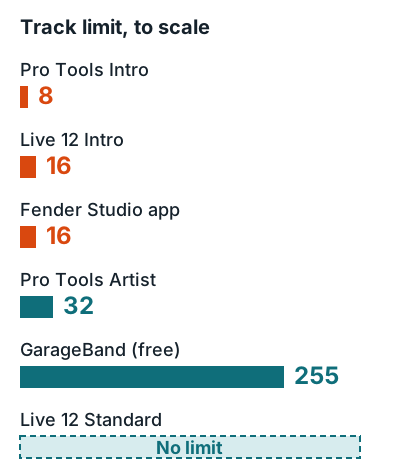
Every paid pick lets you test the full program first, so try two before you pay. The spec that pushes most beginners off their first DAW is the track limit, so check it right next to the price.
| DAW | Free option | First paid step | What the free option stops at |
|---|---|---|---|
| GarageBand | Full app | None (Logic Pro $199.99) | Mac only |
| FL Studio | Trial, no time limit | Producer $179 | Can't reopen saved projects |
| REAPER | 60-day evaluation | $60 discounted | Asks you to buy after 60 days |
| Ableton Live | 30-day Suite trial | Intro $99 | Can't save or export after 30 days |
| Pro Tools | Intro | Artist $9.99 a month | 8 audio tracks, 4 inputs |
| Cakewalk Sonar | Evaluation mode | Membership | 1 Arranger Track, demo amp sim |
Logic Pro is $199.99 once, or comes with Apple Creator Studio at $12.99 a month, and needs an Apple silicon Mac.
How to choose
Match the DAW to your computer first, then your music, then your budget. In that order.
- Check your computer. GarageBand and Logic need a Mac, Sonar needs Windows, and REAPER even runs on Linux.
- Match your music. If you make beats, FL Studio's patterns or Ableton's clips will feel natural. Singers and guitarists tracking takes are better off in GarageBand or REAPER.
- Count your inputs. Pro Tools Intro records 4 inputs at once. That's enough for a singer with a guitar, not a drum kit.
- Make sure it records audio. FL Studio Fruity can't, so if you sing, you need Producer or higher.
- Price the next two years. FL Studio updates are free for life, REAPER covers through version 8.99, and Pro Tools Artist is a subscription.
More software guides
Once you've picked a DAW, these pages cover what comes next.
DAW walkthroughs: vocals in GarageBand, vocals in FL Studio, vocals in Ableton, and guitar in FL Studio. For the hardware side, see what an audio interface does, and for the whole setup, the home recording studio guide.
FAQ
What is the best DAW for beginners?
GarageBand if you have a Mac: it's free, holds up to 255 audio tracks, and includes 40 lessons. On Windows, pick FL Studio Producer for beats, REAPER for recording vocals and instruments, or Ableton Live 12 Intro for loop-based electronic music.
Is FL Studio or Ableton better for beginners?
FL Studio suits beatmakers and never charges for updates, but audio recording starts at the $179 Producer Edition. Ableton Live 12 Intro costs $99 and suits loop and clip work, but stops at 16 tracks.
Can beginners use a DAW for free?
Yes. GarageBand and Pro Tools Intro are free, Cakewalk Sonar is fully functional in its free evaluation mode, and FL Studio's trial never expires but can't reopen saved projects.
Can I switch DAWs later?
Yes. Export each track as an audio file from the same start point and any DAW can import them. Mac users moving from GarageBand to Logic Pro can open GarageBand projects directly.
Do I need an audio interface to use a DAW?
Not to make beats with software instruments. To record a mic or guitar with good quality and low delay, yes, you need one.