Home Recording Studio Equipment List
Home recording studio equipment comes down to six essentials: a computer, a DAW, an audio interface, a microphone, closed-back headphones, and a stand with a pop filter and XLR cable. Studio monitors and acoustic treatment come next. The starter set below costs about $450 to $600 if you already own a computer.
That's a shorter list than the gear forums would have you believe. Buying past it is often GAS (gear acquisition syndrome), not need.
The home studio equipment list
Eight items make a complete home studio, and the first six get you recording.
| Item | What it does | Needed to start? |
|---|---|---|
| Computer | Runs the DAW and stores recordings | Yes (use what you have) |
| DAW | Records, edits, and mixes | Yes (free options exist) |
| Audio interface | Mic preamp, phantom power, converts audio to digital | Yes, unless you use a USB mic |
| Microphone | Captures the voice or instrument | Yes |
| Closed-back headphones | Monitoring while you record | Yes |
| Stand, pop filter, XLR cable | Holds the mic, stops plosives, connects it | Yes |
| Acoustic treatment | Cuts room echo in the recording and the mix | Later |
| Studio monitors | Flat-sounding speakers for mixing | Later |
How the gear connects
Your voice goes through the pop filter into the mic, down an XLR cable into the interface, and over USB into the computer. Then it comes back out of the interface to your headphones or monitors. That path is your signal chain.
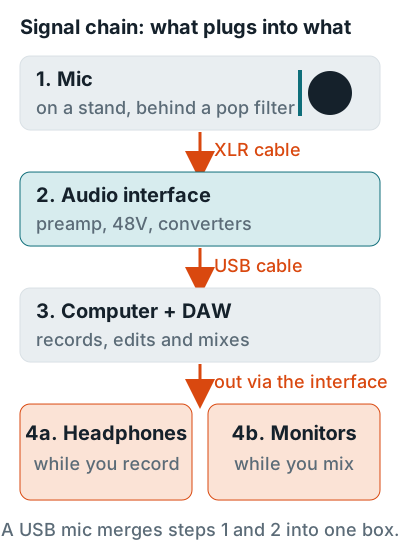
Condenser mics need 48V phantom power from the interface. The Audio-Technica AT2020, for example, runs on 48V DC at about 2 mA. A USB mic folds the mic and interface into one box. See XLR vs USB microphones for when that's enough.
Equipment picks at three budgets
Start with the column that matches what you record, then upgrade one row at a time. Every pick is current on its maker's site.
| Category | Starter | Mid | Upgrade |
|---|---|---|---|
| Audio interface | Focusrite Scarlett Solo 4th Gen | Focusrite Scarlett 2i2 4th Gen | Focusrite Scarlett 18i16 4th Gen |
| Microphone | Shure SM58 | AKG C214 | Neumann TLM 103 |
| Headphones | Sennheiser HD 280 PRO | Beyerdynamic DT 770 PRO 80 ohm | Add Sennheiser HD 600 for mixing |
| Monitors | Skip for now | JBL 305P MkII (pair) | Neumann KH 120 II (pair) |
| DAW | GarageBand (Mac) or REAPER trial | REAPER | Logic Pro (Mac) |
| Mic stand | Hercules MS432B | K&M 210/9 | Triad-Orbit T2 |
| Pop filter | K&M 23956 | K&M 23966 | Neumann PS 20 a |
| Computer | The one you have | Mac mini M6, 16 GB | MacBook Pro M5 Pro |
Starter
1 mic input
Vocals, voice over, or one guitar at a time. Records in any room on headphones.
Mid
2 mic inputs
Sing and play at once, plus monitors for mixing in a treated room.
Upgrade
4 mic inputs
Small drum kits and duos, a long-term condenser, and calibrated monitors.
What each piece of equipment does
Each category below gives the one spec that matters most, then links to the full buying guide.
Computer
Any computer with 16 GB of RAM and an SSD can run a home studio, and Ableton recommends 16 GB for typical music production. Full picks and the Mac vs PC question are in the best computer for home recording.
DAW
Start free. GarageBand is free on the Mac App Store, and REAPER gives you a full 60-day evaluation, then costs $60 for personal use. Compare them in the best DAW for beginners, or see what software you need.
Audio interface
Count your mic inputs first. The Scarlett Solo 4th Gen has 1 mic preamp, the 2i2 4th Gen has 2, and the 18i16 4th Gen has 4. All three list minus 127 dBu EIN on the mic inputs, so you're paying for inputs, not quieter pres. More picks: best audio interfaces and what an audio interface does.
Microphone
Pick a dynamic mic for an untreated room and a condenser for a treated one. The Shure SM58 is a cardioid dynamic with a built-in pop filter. The Neumann TLM 103 is a condenser with 7 dB-A self-noise. Like most condensers, it hears more of the room than a dynamic does. See best microphones for home studios and condenser vs dynamic.
Headphones
Track in closed-back headphones so the click doesn't bleed into the mic. The Sennheiser HD 280 PRO attenuates up to 32 dB of outside noise. The open-back HD 600 is for mixing only. More in best studio headphones.
Studio monitors
Buy monitors after the room is treated. The JBL 305P MkII reaches 49 Hz within plus or minus 3 dB and has a boundary EQ for desks near a wall. The Neumann KH 120 II supports automatic room calibration with Neumann's MA 1. See best studio monitors.
Stands, pop filters, and desks
A boom stand holds the mic where you need it, and a pop filter about 2 inches (5 cm) in front stops plosives, per Rode's pop filter guide. They're cheap, boring, and the first thing you'll miss. Picks are in best mic stands, best pop filters, and best studio desks.
Acoustic treatment
Panels cut the room echo your mic records and the reflections that color what your monitors play back. Start with home studio acoustic treatment, or record in a portable vocal booth if you can't hang panels.
What to buy first
Buy in signal-chain order and stop at headphones. The first six items make a working vocal setup.
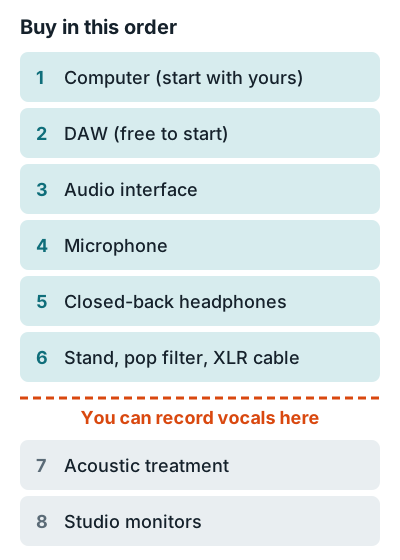
- Use your current computer. Upgrade only if it has under 16 GB of RAM or no SSD.
- Install a free DAW. GarageBand on a Mac, or REAPER's 60-day evaluation on Windows.
- Buy the interface for your input count. One mic input for vocals, two for guitar and vocals together.
- Buy one mic that suits your room. Dynamic for an untreated bedroom, condenser for a treated one.
- Add closed-back headphones, a stand, a pop filter, and an XLR cable. Now you can record.
- Treat the room, then add monitors. Both matter most once you start mixing.
Budget breakdowns are in how much a home recording studio costs and a home studio on a budget. For setting it all up, see the home recording studio guide.
All recording gear guides
Every buying guide in the recording gear section, plus the guide for each main category.
Computers
Desks
Pop filters
Mic stands
Microphones
Interfaces
Monitors
Software
FAQ
What is the best equipment for a home recording studio?
For most people: a Focusrite Scarlett 2i2 4th Gen interface, a Shure SM58 or Audio-Technica AT2020 mic, Beyerdynamic DT 770 PRO 80 ohm headphones, and a free or low-cost DAW like GarageBand or REAPER. Add JBL 305P MkII monitors once the room is treated.
What is the minimum equipment to start recording at home?
A computer, a DAW, an audio interface, a mic with an XLR cable, a stand, and closed-back headphones. A USB mic replaces the interface and the cable if you only record one voice at a time.
Do I need studio monitors to start?
No. Closed-back headphones are enough to record, and monitors only pay off in a room set up for them. Buy them after the interface, mic, and headphones.
How many inputs does my audio interface need?
One mic input for vocals or voice over, two for singing and playing guitar at once, and four or more for drums or a band. The Scarlett Solo, 2i2, and 18i16 4th Gen have 1, 2, and 4 mic preamps.
Should I buy a home recording studio kit?
A kit is worth it when it bundles an interface you'd pick anyway with a usable mic and headphones. Compare its parts against the starter column above before you buy.