How to Mix Vocals
To mix vocals, run this chain in order: high-pass filter, EQ, compressor, de-esser, then reverb on a send. Set each plugin's output to match its input, so a 3 dB compressor cut gets 3 dB of make-up gain, per Avid's gain staging guide.
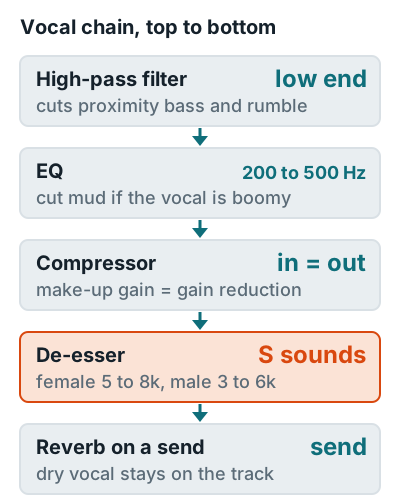
| Step | Where to look | Source |
|---|---|---|
| High-pass | Low end; close mics boost 6 to 10 dB below 100 Hz | Shure SM57 guide |
| Cut mud | 200 to 500 Hz | QSC vocal EQ tips |
| Presence | 4 kHz; too much sounds harsh | QSC |
| De-ess | 5 to 8 kHz female, 3 to 6 kHz male | Apple support |
For a ballad, the REAPER effects guide suggests longer compressor attack and release and a softer knee. Put reverb on a send so the dry vocal stays untouched.
No plugin chain fixes a roomy or distorted take. For repairs, see how to make recorded vocals sound better, and for the whole song, how to record music at home.
Related questions
Should EQ go before or after compression on vocals?
Put corrective EQ first, so the compressor doesn't react to rumble or mud you're about to remove. Apple's Logic Pro guidance also puts EQ before the de-esser.
How do you record and mix vocals for a clean result?
Record dry at 8 to 12 inches with peaks around minus 12 dBFS, then mix with EQ, compression, de-essing, and a reverb send. Reverb recorded in the room can't be removed later.
Why do my vocals sound harsh after mixing?
Usually too much boost around 4 kHz or untamed sibilance at 3 to 8 kHz. QSC warns that pushing 4 kHz makes vocals harsh, and a de-esser handles the S sounds.
More answers: Home recording FAQ