What Does 48V Do on an Audio Interface?
The 48V button on an audio interface turns on phantom power: 48 volts DC sent up the XLR mic cable to power a condenser mic's internal electronics. Condenser mics need it to work at all. Dynamic mics ignore it.
So if your new condenser is dead silent, check this button first.
How phantom power works
Phantom power puts the same 48V on pins 2 and 3 of the XLR cable, with pin 1 at 0V, so the DC rides alongside the audio on the same wires, per DPA's phantom power guide. Both audio pins carry equal voltage, so a balanced input sees no difference between them. That's why a dynamic mic on the same cable doesn't care.
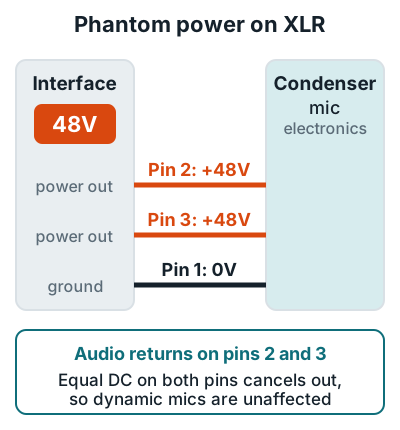
The standard behind it is IEC 61938, which sets 48V plus or minus 4V and up to 10 mA per mic. Shure lists the full worldwide range as 11 to 52 volts DC, but 48V is the standard on home interfaces.
Most condensers sip far less than the limit. Going by DPA's figures, a Neumann U 87 draws 0.8 mA, a Shure KSM9 5.2 mA, and an Earthworks M23 the full 10 mA. If an interface can't hold the voltage under load, DPA notes the mic loses headroom and distorts sooner.
Which mics need phantom power
Any mic with active electronics inside needs phantom power. That means condensers, active ribbons, and active dynamics. The Scarlett 2i2 4th Gen user guide also lists inline mic preamps and active DI boxes.
Needs 48V
Condenser
Neumann TLM 103 (3 mA), Audio-Technica AT2020 (2 mA), RØDE NT1 over XLR.
Needs 48V
Active ribbon
Royer R-122 MKII is rated "48-Volt Phantom Only."
Ignores 48V
Dynamic
Shure SM58, SM57, and SM7B have no electronics to power.
Check first
Passive ribbon
Safe on a good cable, at risk from faults and hot-patching.
Current draw figures are from the Neumann TLM 103 spec page, the Audio-Technica AT2020 spec page, and Royer's R-122 MKII spec sheet. For how the two main types differ beyond power, see condenser vs dynamic microphone.
An inline booster like the Cloudlifter CL-1 runs on 48V too. It uses the phantom power to add up to 25 dB of gain to a quiet dynamic or ribbon mic, and it doesn't pass the voltage on to the mic. So with a Cloudlifter between your SM7B and the interface, 48V stays on.
Can phantom power damage a ribbon mic?
Phantom power can damage some ribbon mics, mostly vintage ones and mostly through a fault. Royer Labs warns that phantom power can stretch or blow the ribbon in some vintage models, while its own ribbons are "not usually affected."
The habit that prevents it is simple. Connect and disconnect ribbons with 48V off, then switch it back on afterward if the interface's 48V is shared with a condenser. Royer's FAQ says that under normal working conditions phantom power won't damage a Royer ribbon. For any other ribbon, check its manual first, as both Shure and Focusrite advise.
How to use 48V safely
Switch phantom power on only after the mic is connected, with the gain down. Shure and Focusrite both give this order to avoid pops that can damage speakers and headphones.
- Turn the gain and monitor volume down. Focusrite recommends lowering the preamp gain before enabling 48V.
- Plug the mic into the XLR input. The 2i2 guide states that 48V is not sent to the 1/4 inch jack inputs.
- Press 48V. On a Scarlett 4th Gen the input mutes for 3 seconds to block the switching transient.
- Bring the gain up. Set levels as in gain staging.
- Switch 48V off before unplugging. This matters most when a ribbon will go into that input next.
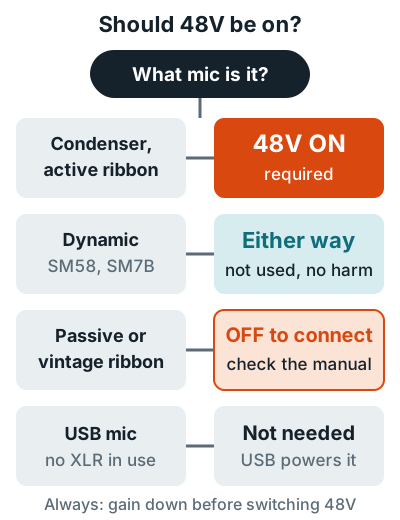
That shared switch is real on the Scarlett 2i2, where one button applies 48V to both XLR inputs. Say you run a vintage ribbon and a condenser at the same time. Then an interface with per-channel 48V is worth paying for. See the best audio interface for home recording.
Condenser mic not working with 48V on?
A silent condenser with 48V on is almost always plugged into the wrong part of the jack. On a combo jack, the XLR pins are the outer three holes. A 1/4 inch plug in the center gets no power.
| Symptom | Likely cause | Fix |
|---|---|---|
| No signal at all | Mic in 1/4 inch input, or wrong channel's 48V | Use the XLR input, check that channel's 48V light |
| Silent for a few seconds | Interface muting after 48V switch-on | Wait; Scarlett 4th Gen mutes 3 seconds |
| Low output, distortion | Supply can't hold 48V under load | Try another input or a dedicated phantom supply |
| USB mic not powered | USB mics don't use phantom power | Power comes from the USB port |
Shure notes some older mixers and cheaper interfaces have no phantom power at all. An external phantom supply between mic and preamp fixes that. If you have no interface yet, how to use an XLR mic without an audio interface covers adapters that supply 48V, and what an audio interface is explains the rest of the box. Mic picks by type are in the microphones for home recording hub.
FAQ
Can phantom power damage a dynamic mic?
No, not a modern balanced dynamic mic. Shure says phantom power will not damage other microphones in the vast majority of cases, so you can leave 48V on with an SM58 or SM7B plugged in.
Should I turn phantom power off before unplugging a mic?
Yes. Shure advises switching it off before plugging or unplugging to avoid pops that can damage speakers or headphones, and Royer gives the same advice for ribbon mics.
Does a USB mic need phantom power?
No. A USB mic takes its power from the USB port; the RØDE NT1 5th Generation datasheet, for example, lists P48 over XLR and 5V over USB.
Why is my condenser mic silent with 48V on?
Check that it's plugged into the XLR part of the combo jack, because interfaces like the Scarlett 2i2 don't send 48V to the 1/4 inch inputs. On a Scarlett 4th Gen, the input also stays muted for 3 seconds after you press 48V.
Is phantom power the same as plug-in power?
No. Plug-in power is the few volts a phone or camera jack sends to small 3.5mm mics; an adapter like the RØDE VXLR Pro converts 12 to 48V phantom power down to 4V plug-in power. Setup steps are in how to use an aux mic on an audio interface.
More answers: Home recording FAQ