What Is an Audio Interface?
An audio interface is the box that sits between your computer and the stuff you plug in: mics, guitars, keyboards, headphones, and monitors. Its preamps raise a mic's 1 to 10 millivolt signal to line level, its analog to digital converter turns that into digital audio your DAW (your recording software) records over USB, and its digital to analog converter plays the result back through your headphones and studio monitors.
If you sing, play guitar, or make beats and want a real performance in the computer, this is the box that gets it there.
What does an audio interface do?
An audio interface does four jobs: it amplifies, it converts to digital, it converts back to analog, and it lets you hear yourself while you record. Everything you record goes in through it, and everything you hear while mixing comes out of it. It's the front door and the back door of your studio.
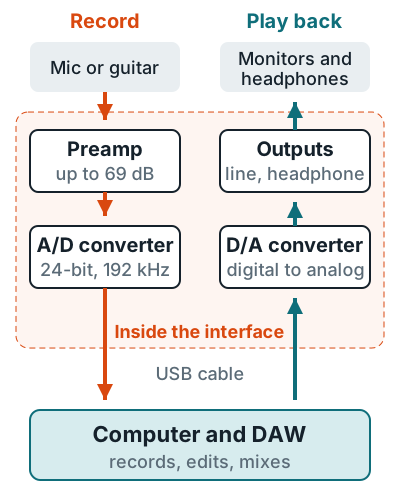
Amplify
Mic preamps add gain, up to 69 dB on a Scarlett 2i2.
Record
The A/D converter samples the signal into numbers.
Play back
The D/A converter drives your monitors and headphones.
Monitor
Direct monitoring sends your inputs straight to your headphones, with no delay.
How does an audio interface work?
An audio interface works by bringing every source up to line level, then sampling it into digital audio. A microphone puts out 1 to 10 millivolts, while line level is about 1 volt, roughly 1,000 times higher, according to Shure's guide to mic and line level. Closing that gap is the preamp's whole job.
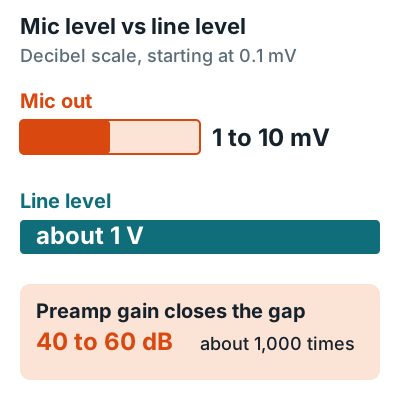
- The preamp adds gain. Shure puts the gap between mic and line level at 40 to 60 dB. The gain knob decides how much of that you add.
- The A/D converter samples it. Focusrite's article on its converters says it plainly: audio has to be converted to a digital signal before a computer can record it. A Scarlett 2i2 samples at up to 24-bit, 192 kHz.
- USB carries it to the DAW. Your recording software stores the numbers, and those numbers are what you edit.
- The D/A converter plays it back. The DAW's output goes back over USB and comes out of the line and headphone jacks as analog audio.
Don't sweat the settings yet. Sample rate and bit depth covers which ones to pick, and gain staging covers how far to turn that gain knob.
Inputs and outputs on an audio interface
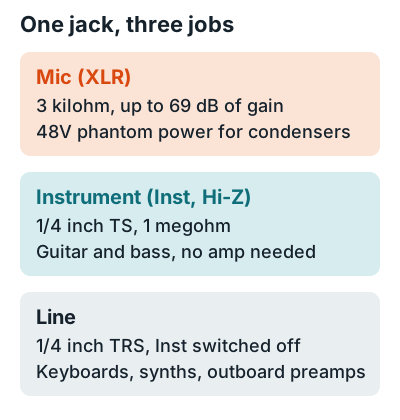
Most interface inputs are combo jacks: one hole that takes either an XLR mic cable or a 1/4 inch plug. A button switches the 1/4 inch side between line and instrument level. The Scarlett 2i2 4th Gen user guide says its Inst button "only affects the 6.35mm (1/4") line input."
| Jack | Connects | Scarlett 2i2 4th Gen spec |
|---|---|---|
| XLR mic input | Dynamic and condenser mics | 3 kilohm, 69 dB gain, switchable 48V phantom power |
| 1/4 inch input, Inst on | Electric guitar, bass | 1 megohm, 12 dBu max |
| 1/4 inch input, Inst off | Keyboards, synths, drum machines | 60 kilohm line input |
| Line outputs 1 and 2 | Active studio monitors | Balanced, 16 dBu max |
| Headphone output | Headphones | Same feed as outputs 1 and 2 |
| USB-C | Computer, power | USB 2.0, bus powered at 900 mA |
Specs come from Focusrite's Scarlett 2i2 page. If you sing into a condenser mic, flip the 48V switch on. What phantom power is explains what that switch does and when to leave it off.
What is an audio interface used for?
You use an audio interface any time you record a mic or instrument into a computer, or want accurate playback out of it. One box covers everything below, as long as it has an input for each source you record at the same moment.
Vocals and voice over
An XLR mic into a mic preamp, with direct monitoring in your headphones. See how to record vocals at home.
Guitar and bass
Plug straight into the Inst input and use amp sim plugins. See connecting a guitar.
Podcasts and duets
Two mics on two preamps, each on its own track.
Mixing on monitors
Balanced line outputs feed active studio monitors. See connecting monitors.
If you only ever record one voice, a USB mic can stand in for an interface, since it has a preamp and converter built in. Do you need an audio interface walks through that call. And if you mostly make beats in the box, the playback side still earns its keep, because it's a DAC; see is an audio interface a DAC.
Example of an audio interface
A typical example is the Focusrite Scarlett 2i2 4th Gen: a 2-in, 2-out USB-C box with two combo inputs, two line outputs, and a headphone jack. A smaller model and a lower-noise one show how the same design varies.
| Interface | Mic preamps | Instrument inputs | Outputs | Power |
|---|---|---|---|---|
| Scarlett Solo 4th Gen | 1 (57 dB gain) | 1 | 2 line, 1 headphone | USB bus |
| Scarlett 2i2 4th Gen | 2 (69 dB gain) | 2 | 2 line, 1 headphone | USB bus |
| MOTU M2 | 2 | 2 (combo) | 2 balanced, 2 RCA, 1 headphone | USB bus |
Picks for every budget and input count are on the best audio interface for home recording page. Once yours arrives, how to connect an audio interface to a computer and how to use an audio interface get you from the box to your first take.
FAQ
Is an audio interface the same as a sound card?
It does the same job, converting between analog and digital audio, but adds mic preamps, phantom power, and instrument inputs. Image-Line's FL Studio manual says "soundcard" is used loosely for built-in and external devices and prefers the term audio interface.
Is an audio interface a DAC?
Yes, and an ADC too. Its digital to analog converter feeds your headphones and monitors, and its analog to digital converter records your inputs.
Does an audio interface need drivers?
On a Mac, usually not: Focusrite says a Scarlett 2i2 needs no driver on macOS. On Windows, install the maker's ASIO driver, which Focusrite bundles with its Focusrite Control 2 software.
Does an audio interface improve sound quality?
Compared with a laptop's mic jack, yes, because it adds clean gain, phantom power, and balanced inputs. Between two current interfaces, the difference is small next to your mic and room; see does an audio interface improve sound quality.
Can I record without an audio interface?
Yes, with a USB mic, which has its own preamp and converter built in. You need an interface for XLR mics, direct guitar, or more than one source at once.
More answers: Home recording FAQ