How to Record Loud Vocals Without Clipping
To record loud vocals without clipping, set the interface gain while the singer belts the loudest line, aim for peaks no higher than minus 6 dBFS, and give the singer more distance from the mic. If gain is already near minimum and peaks still hit 0 dBFS, engage the mic or interface pad. Record at 24-bit so the extra headroom costs you nothing in noise.
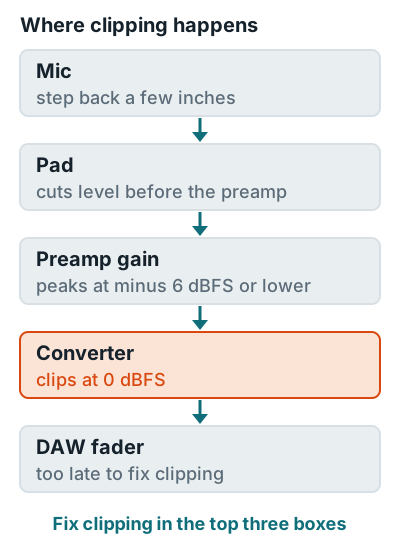
Five fixes, in order
- Set gain on the loudest line. Avid's gain staging guide says to aim for maximum levels of minus 6 dBFS on the peak meter, and Neumann's vocal guide says to leave about 10 dB of headroom above the highest peaks.
- Recheck after take one. Neumann notes singers usually sing louder in real takes than in the soundcheck.
- Add distance. Neumann's starting distance is 8 to 12 inches (20 to 30 cm). On belted notes, let the singer lean back a few inches instead of you riding the gain.
- Engage the pad. A pad cuts the signal before the preamp. The AKG C214 has a switchable 20 dB pad that lets it handle sources up to 156 dB SPL.
- Use clip protection if you have it. On the Focusrite Scarlett 4th Gen, Clip Safe "automatically adjusts your preamp gain if you're at risk of clipping," per the Scarlett 2i2 4th Gen user guide.
Target numbers are on how loud should you record vocals, and the full level chain is in gain staging. For the rest of the session, see how to record music at home.
Related questions
Can you fix a clipped vocal after recording?
Not reliably at 24-bit, because the waveform tops are already cut off, so the safe fix is another take. Logic Pro's guide says clipping in a 32-bit float recording can be removed by lowering region gain, but that can't repair a signal that already clipped at the interface's converter.
Why does my vocal clip when the meter looked fine in the soundcheck?
Singers often hold back during a soundcheck and sing louder on real takes. Neumann's vocal guide says to review gain after the first take for exactly this reason.
Does lowering the DAW fader stop clipping?
No. Clipping on the way in happens at the preamp and converter, before the DAW fader. Drop the interface gain or hit the pad instead.
More answers: Home recording FAQ