Home Recording FAQ
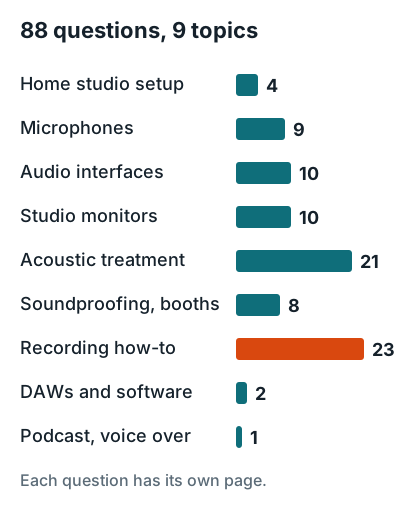
This home recording FAQ answers 88 questions, grouped by topic, each in a line or two. Get the short answer here, then click through when you want the full story. Each topic also links to its main guide.
Home studio setup
Full guide: home recording studio guide.
- How to Build a Home Recording Studio To build a home recording studio, work in this order: choose the quietest room, set up a computer and DAW, add an audio interface, mic, and closed-back headphones, wire them together, place your desk and monitors, then treat the room.
- What Are Some Good Home Studio Setup Ideas? The best home studio ideas start from the room you have: a clothes closet for vocals, a bedroom or spare room for beats and mixing, a garage or basement for drums and amps, and a living room corner when no room is yours.
- What Do I Need to Record Music at Home? To record music at home you need six things: a computer, a DAW (recording software), an audio interface, a microphone, closed-back headphones, and a mic stand with an XLR cable.
- How Much Does a Home Recording Studio Cost? A home recording studio costs about $350 for a starter setup, $1,100 for a solid home studio, $3,400 for a treated project studio, and $10,900 or more for pro-level gear, using makers' listed prices at the time of writing.
Microphones
Full guide: microphone guide.
- What Does 48V Do on an Audio Interface? The 48V button on an audio interface turns on phantom power: 48 volts DC sent up the XLR mic cable to power a condenser mic's internal electronics.
- How to Use an XLR Mic Without an Audio Interface To use an XLR mic without an audio interface, plug it into an XLR to USB adapter, a USB mixer, or a portable recorder that works over USB.
- How to Use a Regular Aux Mic on an Audio Interface To use a regular aux (3.5mm) mic on an audio interface, plug it into a 3.5mm to XLR adapter that turns the interface's 48V phantom power into the low-voltage plug-in power small mics run on.
- What Is a Good Microphone for Recording Vocals? A good microphone for recording vocals is a cardioid large-diaphragm condenser if your room is treated, or a cardioid dynamic if it isn't.
- Can You Record Vocals With an SM57? Yes, you can record vocals with an SM57: it uses the same cartridge design as the SM58 vocal mic, according to Shure's SM57 vs SM58 FAQ.
- Are Dynamic Microphones Good for Recording Vocals? Yes, dynamic microphones are good for recording vocals, and they're often the better choice in an untreated home room.
- Are USB Mics Good for Recording Vocals? Yes, USB mics are good for recording vocals at demo, podcast, and home-release quality.
- What Is the 3:1 Rule for Microphones? The 3:1 rule says a second microphone should be at least three times as far from the first mic as the first mic is from its source.
- What Is the Holy Grail of Microphones? The holy grail of microphones is usually the Neumann U 47, a tube condenser made from 1949 to 1965 that Neumann itself calls the foundation of the "Neumann sound."
Audio interfaces
Full guide: audio interface guide.
- What Is an Audio Interface? An audio interface is the box that sits between your computer and your mics, instruments, and speakers.
- How to Record in FL Studio Without an Audio Interface To record in FL Studio without an audio interface, open Audio Settings (F10). On Windows, choose FL Studio ASIO, set its Input to your USB or built-in mic, and set its Output to your headphones.
- Why Do I Need an Audio Interface? You need an audio interface to record an XLR microphone, to plug a guitar or bass in directly, or to record two or more sources at the same time.
- How to Use an Audio Interface To use an audio interface, connect it to your computer over USB, choose it as the input and output device in your DAW, plug a mic or guitar into the front input, turn the gain up until your loudest part stays green, and turn on direct monitoring so you hear yourself with no delay.
- How to Connect an Audio Interface to a Computer To connect an audio interface to a computer, plug it into a USB port with the cable in the box, install the maker's driver or control app (needed on a Windows PC, usually optional on a Mac), then select the interface as the input and output device in your DAW.
- Does an Audio Interface Improve Sound Quality? Yes, an audio interface improves sound quality when you record, because it gives a mic or guitar a real preamp, the right input impedance, and a clean converter, which a laptop's 3.5 mm jack can't.
- How to Connect a Guitar to an Audio Interface To connect a guitar to an audio interface, run a standard 1/4 inch TS guitar cable from the guitar into the interface's front input and press the Inst (or Hi-Z) button.
- Can a Mixer Be Used as an Audio Interface? Yes, a USB mixer can be used as an audio interface, but a mixer with only 2 USB channels sends just a stereo mix to the computer, so all your mics land on one track.
- Do I Need a Preamp to Record Vocals? No, you don't need a separate preamp to record vocals, because your audio interface already has one on every mic input.
- Is an Audio Interface a DAC? Yes, every audio interface is a DAC: its digital to analog converter turns playback from your computer into the analog signal that drives studio monitors and headphones.
Studio monitors
Full guide: studio monitor guide.
- What Are Studio Monitors? Studio monitors are speakers built to reproduce sound flatly, so you hear a recording as it is instead of with extra bass and treble.
- How to Connect Studio Monitors to a Computer To connect studio monitors to a computer, plug an audio interface into the computer over USB, then run one balanced cable from each interface line output to each monitor.
- How to Set Up Studio Monitors To set up studio monitors, place them so they and your head form an equilateral triangle, with the tweeters at ear height and each monitor turned in to point at you.
- Can You Use Studio Monitors to Listen to Music? Yes, you can use studio monitors to listen to music, and to game, watch TV, or replace computer speakers.
- Can You Use Regular Speakers as Studio Monitors? Yes, you can use regular speakers as studio monitors, as long as you learn how they color the sound.
- How to Clean Studio Monitors To clean a studio monitor, unplug it and wipe the cabinet with a dry, soft microfiber cloth.
- Can You Put Studio Monitors on Their Side? You can put studio monitors on their side only if they are coaxial or the manual allows it; standard two-way monitors should stand upright.
- Are Studio Monitors Worth It? Studio monitors are worth it once you mix music other people will play on speakers, because they show bass, stereo width, and balance the way a room presents them.
- Can You Leave Studio Monitors On? You can leave studio monitors on all the time if they have auto standby; Genelec says its speakers "can be on as long as you want to," in its support answer.
- What Is the Difference Between Active and Passive Studio Monitors? Active studio monitors have their power amplifiers and crossover built into the cabinet, while passive monitors have no amplifier and need a separate power amp.
Acoustic treatment
Full guide: acoustic treatment guide.
- What Do Acoustic Panels Do? Acoustic panels absorb sound that hits them instead of reflecting it back into the room, which cuts echo, flutter, and reverb time.
- How to Hang Acoustic Panels Hang acoustic panels on drywall with screws and wall anchors through the hanger on the panel's back, which GIK calls "the most secure and effective option." Impaling clips and Z-clips hold a panel level and tight to the wall, and ceiling clouds hang from brackets or wires with a 4 inch air gap.
- How to Make Acoustic Panels To make an acoustic panel, build a frame from 1x4 boards around a 3 inch mineral wool batt and wrap it in breathable fabric.
- How Many Acoustic Panels Do I Need? Most home studios need panels covering 25 to 35 percent of the wall area: 11 two by four foot panels in a 12 x 10 x 8 ft practice or recording room, and 16 if you mix in it.
- Where to Place Acoustic Panels Place acoustic panels first at the side wall first reflection points, the spots where you can see a monitor in a mirror slid along the wall from your mix seat.
- Do Acoustic Panels Keep Sound Out? No, acoustic panels don't keep sound out or in; they absorb reflections inside the room and leave noise through the walls almost unchanged.
- Do Acoustic Panels Work? Yes, acoustic panels work for echo and reflections: in lab tests 2 inch Owens Corning 703 fiberglass absorbs 1.14 at 500 Hz and 1.16 at 1 kHz, meaning it takes in essentially all the sound that hits it.
- How to Cut Acoustic Panels Cut acoustic panels with the tool that matches the material: an electric carving knife for foam, a serrated insulation knife for fiberglass or mineral wool, and a fine tooth saw plus a utility knife for wood slat panels.
- What Are Acoustic Panels Made Of? Acoustic panels are made of a porous core, usually rigid fiberglass, mineral wool, open cell foam, or polyester (PET) felt, often in a wood frame under breathable fabric.
- Do Acoustic Panels Help With Insulation? Acoustic panels barely help with insulation: a 2 inch fiberglass core has some thermal resistance, but panels cover only patches of wall and air moves freely around them.
- How Much Do Acoustic Panels Cost? A bought 2 by 4 foot fiberglass or mineral wool acoustic panel from GIK Acoustics or ATS Acoustics costs about $90 to $120, and a DIY panel's core and fabric cost about $45 before the wood frame.
- What Fabric to Use for Acoustic Panels? Use a breathable polyester or polypropylene weave rated ASTM E84 Class A, such as Guilford of Maine FR701 or Sona, or Camira Cara.
- Can You Paint Acoustic Panels? You can paint acoustic panels only with a light spray coat; rolling or brushing on paint seals the surface and cuts absorption roughly in half.
- Should I Put Acoustic Panels Behind Speakers? Yes, put a thick acoustic panel on the wall behind each speaker, because that front wall reflects bass back into the monitor's direct sound and cuts a dip in the low end.
- How Thick Are Acoustic Wall Panels? Acoustic wall panels come 1 to 4 inches thick, and a home studio needs at least 4 inches at its main reflection points.
- Can You Put Acoustic Panels on a Door? Yes, you can put acoustic panels on a door, and it helps when the door sits at a reflection point or behind your mic, but it won't stop sound passing through the door.
- How Far Off the Wall Should Acoustic Panels Be? Mount acoustic panels with an air gap at least as deep as the panel is thick, so a 4 inch panel sits 4 inches off the wall.
- Do I Need to Cover the Entire Wall With Acoustic Panels? No, you don't need to cover the entire wall: most home studios need panels on 25 to 35 percent of the wall area, placed where reflections reach your ears and where bass builds up.
- What Are the Disadvantages of Acoustic Panels? The main disadvantages of acoustic panels are that they don't block sound, they can make a room sound dead if overused, a room needs more of them than most people expect, and the thick ones that handle bass take up wall depth.
- What Is the 38% Rule in Room Acoustics? The 38% rule says to sit with your head 38 percent of the room's length from the front wall, because that is where low bass peaks and nulls do the least damage.
- Do I Really Need Acoustic Treatment? You don't need acoustic treatment to start if you record close to a dynamic mic and mix on headphones; you do need it once you mix on studio monitors or record with a mic farther from the source.
Soundproofing and vocal booths
Full guide: soundproofing guide.
- How to Soundproof a Room To soundproof a room, seal every air gap first, then upgrade the door and windows, and only then add mass and decoupling to the walls, floor, and ceiling.
- How to Soundproof a Room Cheaply The cheapest way to soundproof a room is to seal its air gaps: in a Hilti lab test, sealing the perimeter gaps of a chase wall raised it from STC 34 to STC 63. After that, the best value is sealing the door, then insulating any wall you have open, then adding damped drywall.
- How Can I Soundproof My Home Studio? You soundproof a home studio by sealing every air gap, then decoupling the walls from each other, then adding mass, in that order.
- How to Soundproof a Room From Outside Noise To soundproof a room from outside noise, fix the windows first: most standard double-pane windows rate around STC 26, per Pella, against STC 36 for an insulated wood stud wall with one layer of 5/8 inch Type X drywall per side in Table 9.10.3.1.-A of the BC Building Code.
- How Much Does It Cost to Soundproof a Room? Soundproofing a room costs under $100 in materials to seal its gaps, $528 per window insert, roughly $830 to $2,400 to add damped or decoupled drywall to a 10 by 12 foot room, and several thousand dollars for a room within a room.
- How to Build a Vocal Booth The easiest DIY vocal booth is a closet lined with six 2 by 4 foot absorbing panels; the next is a 48 by 48 by 78 inch PVC frame hung with heavy blankets.
- How to Soundproof a Room in an Apartment To soundproof a room in an apartment without damage, seal the door, swap in a solid core door, fit press-in window inserts, put padded rugs down, and make your source quieter.
- How Much Does It Cost to Build a Vocal Booth? A DIY vocal booth costs about $250 to $700 as a closet lined with panels, a fabric booth lists at $549.99 to $799.99, and a sealed prefab booth lists at $5,595 to $9,405. Only the sealed booths block outside noise; the rest fix echo.
Recording how-to
Full guide: recording guide.
- How to Record Music at Home To record music at home, plug a mic or guitar into an audio interface, record each part as its own track in a DAW at 48 kHz and 24-bit with peaks around minus 12 dBFS, then comp, mix, and bounce the song to a WAV file.
- How to Record Vocals in FL Studio To record vocals in FL Studio, select your interface's ASIO driver, route the mic input to an empty Mixer track from the Mono list, set the recording pickup to EXT, then arm the track and record into the Playlist.
- How to Record Guitar on a Computer Recording yourself playing guitar on a computer takes three things: an audio interface, a guitar cable, and a DAW.
- How to Record Vocals in GarageBand To record vocals in GarageBand on Mac, choose your mic in GarageBand > Settings > Audio/MIDI, add an Audio track set to Mic or Line, set the Record Level in Smart Controls, then press R to record and the Space bar to stop.
- How to Record Acoustic Guitar To record acoustic guitar, point one condenser mic at the 12th fret from 10 to 12 inches away, and keep it off the sound hole.
- How to Mix Vocals To mix vocals, run the chain in this order: high-pass filter, EQ, compressor, de-esser, then reverb on a send.
- How to Record Guitar in FL Studio To record guitar in FL Studio, plug the guitar into your interface's instrument input, route that input to an empty Mixer track from the Mono list, set the recording pickup to EXT, then arm the track and press Record and Play.
- How to Record Vocals at Home To record vocals at home, sing 8 to 12 inches (20 to 30 cm) from the mic behind a pop filter, set the gain so the loudest line peaks about 10 dB below 0 dBFS at 24-bit, and record in a dry room away from corners.
- How to Record Vocals in Ableton To record vocals in Ableton Live, create an audio track, set Audio From to Ext. In and pick your mic's input, arm the track, set Monitor to Auto, then press the Arrangement Record button.
- How to Produce Music at Home To produce music at home, you need a computer, a DAW, and headphones or monitors, plus a six-stage workflow: sketch, arrange, record, edit, mix, and master.
- How Loud Should You Record Vocals? Record vocals so the loudest line peaks between minus 12 and minus 6 dBFS on your DAW meter, with the average around minus 18 dBFS.
- How to Make Recorded Vocals Sound Better To make recorded vocals sound better, fix the source first: sing 8 to 12 inches from the mic, record in a dry spot, and leave about 10 dB of headroom above the loudest peak.
- Do You Record Vocals in Mono or Stereo? Record vocals in mono. A single mic records a mono signal, so a stereo track just gives you two copies of the same thing.
- Can You Record Guitar and Vocals at the Same Time? Yes. Put one mic on your voice and one on the guitar, plug both into a two-input interface, and record them to separate tracks.
- How to Record Loud Vocals Without Clipping To record loud vocals without clipping, set the interface gain while the singer belts the loudest line, aim for peaks no higher than minus 6 dBFS, and give the singer more distance from the mic.
- How to Record Backing Vocals To record background vocals, finish the lead first, then sing each double and harmony as its own new take while listening to the lead, and pan them off center, tucked under it.
- How to Prepare for a Vocal Recording Session To prepare for a vocal recording session, rest and hydrate your voice, keep the room near 30 percent humidity, know the song by heart, and have the mic, headphones, and session ready before the first take.
- How to Record Drums at Home To record drums at home, start with one mic about 12 inches (30 cm) above the drummer's right shoulder, aimed at the snare. Then add a kick mic, a snare mic, and a second overhead as you get more inputs.
- How Many Vocal Tracks Should I Record? Record four or five full lead takes and comp them into one track, then add one or two doubles and two to four harmony parts at most.
- How to Monitor Vocals While Recording To monitor vocals while recording, plug closed-back headphones into your audio interface and turn on direct monitoring, which sends the mic straight to your ears with near zero latency.
- What Is the Best Way to Record Myself at Home? The best way to record yourself at home is a cardioid mic into a computer running a free DAW, monitored on closed-back headphones, with your phone filming video at the same time.
- What Equipment Do I Need to Record Vocals at Home? To record vocals at home you need six things: a cardioid microphone, a pop filter, a mic stand, an audio interface with phantom power, closed-back headphones, and a computer running a DAW.
- What Is the Best Way to Record a Voice Over at Home? The best way to record a voice over at home is a cardioid dynamic mic 1 to 6 inches from your mouth, in a small space lined with soft material such as a clothes-filled closet, recording a room quiet enough to measure minus 60 dB RMS or lower when you're silent.
DAWs and software
Full guide: DAW guide.
- How to Turn Off Monitoring in FL Studio To turn off monitoring in FL Studio, select the Mixer track your mic or guitar is routed to, press Ctrl+Enter to open Mixer Track Properties, and set Monitor external input to Off.
- What Software Do You Need to Record Music at Home? To record music at home you need three pieces of software: a DAW (digital audio workstation) to record and mix, the driver for your audio interface, and plugins for effects and instruments, which every DAW already includes.
Podcast and voice over
Full guide: podcast studio guide.
- How to Set Up a Podcast Studio at Home To set up a podcast studio at home, give each host a dynamic mic 1 to 6 inches from their mouth, record each mic to its own track, put everyone in closed-back headphones, and use the smallest, softest room you have.
Most asked
How to Soundproof a Room?
To soundproof a room, seal every air gap first, then upgrade the door and windows, and only then add mass and decoupling to the walls, floor, and ceiling. Full answer.
How to Build a Home Recording Studio?
To build a home recording studio, work in this order: choose the quietest room, set up a computer and DAW, add an audio interface, mic, and closed-back headphones, wire them together, place your desk and monitors, then treat the room. Full answer.
What Does 48V Do on an Audio Interface?
The 48V button on an audio interface turns on phantom power: 48 volts DC sent up the XLR mic cable to power a condenser mic's internal electronics. Full answer.
What Is an Audio Interface?
An audio interface is the box that sits between your computer and your mics, instruments, and speakers. Full answer.
How to Record Music at Home?
To record music at home, plug a mic or guitar into an audio interface, record each part as its own track in a DAW at 48 kHz and 24-bit with peaks around minus 12 dBFS, then comp, mix, and bounce the song to a WAV file. Full answer.