How to Set Up Studio Monitors
To set up studio monitors, place them so they and your head form an equilateral triangle, with the tweeters at ear height and each monitor turned in to point at you. The Yamaha HS manual gives you exactly this layout. The Neumann KH 120 II manual specifies plus or minus 30 degrees from center, the same triangle.
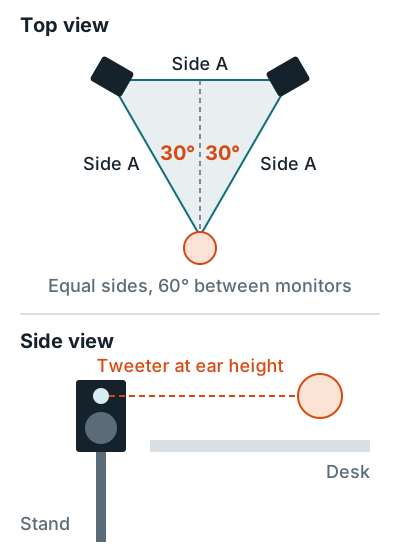
Steps to position studio monitors
- Center the desk on the room's width. Genelec's 8030C manual says to place the monitors symmetrically and at equal distance from the listening position.
- Build the triangle. Make the gap between the monitors match the distance from each one to your head, say 4 feet on all three sides.
- Aim them at you. Turn each monitor about 30 degrees in so its acoustic axis points at your head. Neumann says to aim it in both the horizontal and vertical planes.
- Raise the tweeters to ear height. Put them on stands behind the desk, which Genelec recommends over sitting them on the desk. Keep them upright (more in putting monitors on their side). Yamaha says the HS series "should be used vertically, not laid on their side."
- Mind the wall behind. Neumann says to avoid about 2.6 to 5.7 ft (0.8 to 1.75 m) from the wall behind the monitor, where reflections cause bass dips. If yours end up close to a wall and sound boomy, use the rear bass cut, which on Yamaha HS models cuts 2 or 4 dB below 500 Hz.
- Connect, then power on last. Your interface goes on first and the monitors last. Going off, the monitors go first. The Yamaha manual gives that order.
Treating the wall behind your monitors helps more than small position moves. See acoustic panels behind speakers and the 38 percent rule for where you sit. Cabling is in how to connect studio monitors to a computer, and our picks are in the best studio monitors for home studios.
Related questions
How far apart should studio monitors be?
As far apart as each one is from your head, which makes an equilateral triangle. If you sit 4 feet from each monitor, put them 4 feet apart.
Should studio monitors be angled?
Yes. Turn each one about 30 degrees in so its acoustic axis points at your head, and tilt it if the tweeter sits above or below ear height.
Should studio monitors go on the desk or on stands?
Stands behind the desk are better. Genelec recommends stands high enough that the desk doesn't block the woofer, which also cuts desk vibration.
More answers: Home recording FAQ