How to Build a Home Studio on a Budget
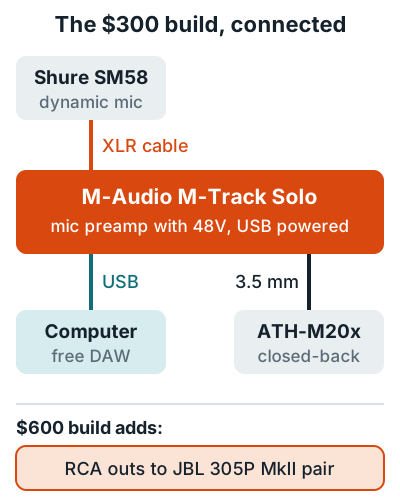
A cheap music studio that records clean vocals and guitar costs about $300: an M-Audio M-Track Solo interface, a Shure SM58 mic, Audio-Technica ATH-M20x headphones, a mic stand and XLR cable, and free recording software. For about $600, add a pair of JBL 305P MkII studio monitors so you can mix on speakers.
The $300 home studio build
This budget home studio has one mic input, which covers vocals, voice over, and acoustic guitar, plus an instrument input for electric guitar or bass. That's enough to make real demos, and plenty of released songs started on less.
| Part | Pick | Why this one | Price band |
|---|---|---|---|
| Interface | M-Audio M-Track Solo | 48V, up to 54 dB mic gain, USB powered | Under $100 |
| Mic | Shure SM58 | Dynamic, built-in pop filter | $100 to $130 |
| Headphones | Audio-Technica ATH-M20x | Closed-back, 40 mm drivers | $59 listed |
| Stand and cable | Any boom stand, 10 ft XLR | Holds the mic, connects it | $30 to $50 |
| Software | Free DAW | See below | $0 |
Interface
M-Track Solo
One phantom-powered mic preamp, a line/instrument input, RCA outs, and a 3.5 mm headphone jack.
Mic
SM58
Cardioid dynamic with a steel mesh grille, so there's no pop filter to buy.
Headphones
ATH-M20x
Closed-back dynamic design with 40 mm drivers.
The dynamic mic is on purpose: a 58 often picks up less of an untreated bedroom than a cheap condenser does. Specs are from the M-Track Solo page, which lists 0 to 54 dB of mic gain and 48 kHz recording, the Shure SM58 page, and the ATH-M20x page, which lists it from $59 at the time of writing. Other interfaces in this price range are compared in best audio interface under $150, and other mics in best budget microphone for vocals.
The $600 home studio build
The $600 build is the $300 build plus a pair of studio monitors and the cables to connect them. Monitors let you check mixes on speakers, and everything else stays the same.
| Add | Pick | Key spec | Price band |
|---|---|---|---|
| Monitors | JBL 305P MkII (pair) | 5 inch woofer, 49 Hz to 20 kHz (plus or minus 3 dB) | $250 to $350 a pair |
| Cables | 2 RCA to 1/4 inch TS cables | M-Track Solo RCA outs to monitor inputs | Under $20 |
The JBL 305P MkII spec page lists balanced XLR and 1/4 inch inputs with a plus 4 dBu or minus 10 dBV sensitivity switch. It also has a boundary EQ that cuts 1.5 or 3 dB at 50 Hz when the monitors sit on a desk or near a wall. Set them up in an equilateral triangle as shown in how to set up studio monitors.
Free recording software
You don't need to buy a DAW to start. Three zero-cost routes fit this build:
Bundled
MPC Beats
Included with the M-Track Solo, with AIR effect plugins and instruments.
Free forever
Audacity
Free and open source on Windows, macOS, and Linux.
60-day trial
REAPER
Full features for 60 days, then a $60 discounted license.
Audacity's site says it "will always remain free for everyone." REAPER's discounted license covers personal use and businesses under $20,000 a year in revenue. Pick one and learn it before you shop for another. More options are ranked in best free DAW.
Buying used gear safely
Used mics, stands, and cables are the safest savings. Used interfaces need an operating system check first. Two manufacturer facts shape the risk.
- Accept that a used mic has no warranty. Shure says its two-year warranty is only valid when you buy from an authorized reseller.
- Watch for fakes. Shure says a fake is often difficult to spot online and warns buyers to be skeptical of sellers offering unreasonably low prices. Buy SM58s locally where you can inspect them.
- Check the interface against your OS. Focusrite's macOS compatibility list shows 1st Gen Scarlett Solo and 2i2 still supported, but its Forte interface and FireWire Saffire models are not supported on current Macs. Look up any used model the same way.
- Test before paying. Plug in a mic, switch on 48V, sweep the gain, and turn every knob while listening on headphones for crackle or dropouts.
What to buy next
After the $600 build, spend on the room before better gear. Panels change every source you record and every mix, while a new mic only changes what you put in front of it. GAS (gear acquisition syndrome) will tell you otherwise. Ignore it.
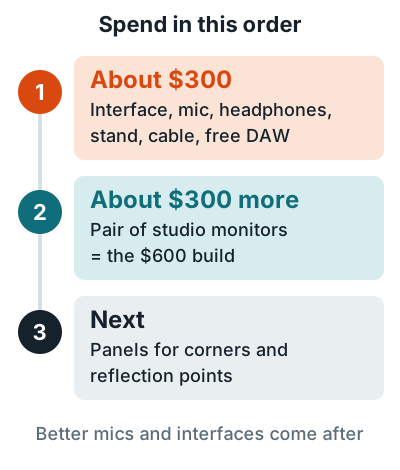
Where panels go is in where to place acoustic panels, and full cost ranges for bigger setups are in how much a home recording studio costs. If you'd rather buy one box, see the best home recording studio kit, and for room layout ideas see home studio ideas. The home recording studio guide links every step.
FAQ
What is the cheapest way to set up a home studio?
A one-input USB interface, a dynamic mic, closed-back headphones, a stand and cable, and free software, for about $300. You can skip monitors at first and mix on the headphones.
Do I need studio monitors on a budget?
Not to start recording. Headphones cover tracking and rough mixes. Monitors are the next $300 once you start mixing seriously.
Is it worth buying used studio gear?
Yes for mics, stands, and cables, with care. Shure's warranty only applies when you buy from an authorized reseller, so a used mic has none, and Shure warns that fakes are hard to spot online.
Do I need a pop filter with an SM58?
No. Shure says the SM58's built-in spherical filter minimizes wind and breath pop noise.
What free software can I record with?
Audacity is free on Windows, macOS, and Linux, the M-Track Solo includes MPC Beats, and REAPER gives you 60 days of full use before a $60 discounted license.