How to Record Guitar on a Computer
Recording yourself playing guitar on a computer takes three things: an audio interface, a guitar cable, and a DAW. Plug straight into the interface's instrument input for a silent, clean track you can shape with an amp sim plugin. Or put a mic 1 to 12 inches from your amp's speaker if you want your real amp's sound.
If you're writing songs in a bedroom late at night, going direct is the friendly answer for your neighbors. If your tone lives in your amp, mic it.
Pick a method: DI, amp sim, or mic
Choose by how loud you can play and whether you want to change the tone after recording. DI and amp sim use the same cable and the same recorded track. Only the miked amp locks the tone in at the source, so commit to it only if you love the sound in the room.
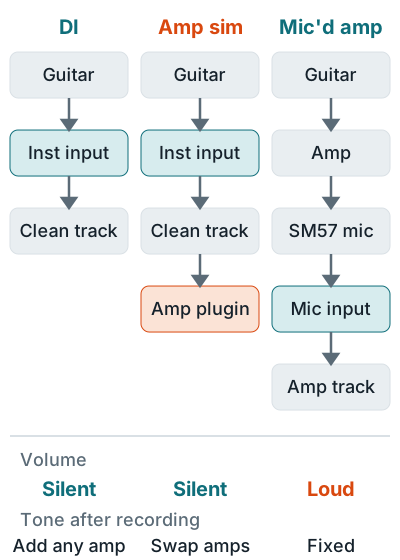
| Method | You need | Noise in the room | Tone after recording |
|---|---|---|---|
| DI (direct in) | Interface with an Inst input, TS cable | None | Clean, add any amp later |
| DI plus amp sim | The above, plus an amp plugin | None | Swap amps and settings any time |
| Miked amp | Amp, dynamic mic, XLR cable, mic stand | Loud | Fixed at the source |
Record direct (DI)
Going direct means running a 1/4 inch TS cable (a regular guitar cable) from the guitar into the interface's front input with Inst switched on. On a Scarlett 2i2 4th Gen, Inst sets a 1 megohm input impedance, compared with 60 kilohms for the line setting.
- Plug in and press Inst. Cable and button details are in how to connect a guitar to an audio interface.
- Create a mono audio track with its input set to the interface input you used. Focusrite says recording one guitar onto a stereo track is the usual reason it plays from one side only.
- Set the gain on your hardest strum. Turn up until the level meter stays green. Amber means close to clipping, and red means clipped. Target levels are in gain staging.
- Arm the track and record. The take is the dry guitar signal, so it'll sound thin and plunky until you add an amp. That's normal.
Add an amp sim plugin
An amp sim is a plugin that makes the clean DI track sound like a guitar amp and cabinet. Insert it on the guitar track and you hear the amp tone while playing, but the recorded file stays clean. Hate the tone next week? Swap the amp and keep the take.
Most DAWs include one, so check yours before you buy a plugin. The best DAW for beginners compares what each costs. GarageBand includes a range of amps, speaker cabinets, and stompboxes, and Fender's Mustang and Rumble plugins add 57 guitar and bass amp models to Fender Studio Pro and the Fender Studio app.
Monitor through the DAW
Direct Monitor off
Direct monitoring skips the computer, so it skips the plugin. You'd hear a clean guitar plus a late amp tone.
Keep the buffer low
Lowest without clicks
A smaller buffer means less delay between pick and sound. Raise it only if you hear clicks or dropouts.
The buffer advice comes from Focusrite's buffer size guide, which says to set it "as low as you can to reduce latency" while recording and as high as you like while mixing. Focusrite's latency article adds that some plugins add their own delay, so a long chain of plugins on the guitar track makes it worse.
Mic your amp
To record guitar with a microphone, put a dynamic mic like the Shure SM57 close to the speaker grille, run an XLR cable to a mic input, and leave Inst off. Shure's SM57 user guide gives four starting positions, each with a different tone.
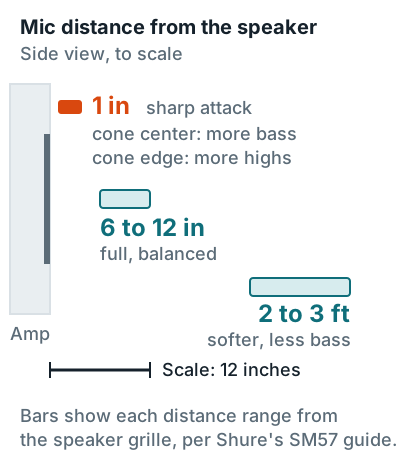
- Start 1 inch from the grille. Aim at the center of the cone for more bass, or at the edge of the cone for more high end, per the SM57 guide.
- Move back for a rounder sound. At 6 to 12 inches Shure describes the tone as full and balanced. At 2 to 3 feet the attack softens and the bass drops.
- Set the amp to the volume where it sounds best, then set interface gain so peaks stay out of the red.
- Listen on closed-back headphones while someone else moves the mic, or record short tests and compare.
Recording acoustic guitar uses different mic positions, covered in how to record acoustic guitar.
Record a DI track and the amp together
Record a clean DI track at the same time as the miked amp and you can replace or blend the amp tone later. It's cheap insurance for the take where you finally nailed the part. Radial's reamping guide starts with the guitar in a DI box and calls the DI track the source for reusing a take.
- Guitar into a DI box. Its thru jack feeds the amp, and its XLR output feeds interface input 2.
- Mic the amp into input 1 and record both inputs on two mono tracks.
- Keep the DI track muted while mixing unless you add an amp sim to it. Later, a reamp box can send it back out to a real amp.
Playing and singing in one take needs a different setup. See recording guitar and vocals at the same time. Interfaces with good instrument inputs are in the best audio interface for guitar, FL Studio users have their own walkthrough, and the rest of the session is in how to record music at home.
FAQ
Should I record guitar on a mono or stereo track?
Mono. One guitar cable or one mic is a single channel, and Focusrite says recording it on a stereo track is the usual reason it plays from one side only. Use stereo only for two mics, such as an XY pair on acoustic guitar.
Why do I hear a delay when I play through an amp sim?
The plugin runs inside the computer, so you hear the guitar after the audio buffer. Lower the buffer size until it feels tight, and raise it again only if you hear clicks or pops.
Do I need a DI box to record guitar?
Not to go direct: the interface's Inst input does the job. You need one when you want a clean DI track and a miked amp from the same take, because the DI box splits the signal.
What is the best free software to record guitar?
GarageBand on a Mac, which includes a range of amps, speaker cabinets, and stompboxes. On Windows, Cakewalk Sonar is free in evaluation mode and ships a demo of the Overloud TH-U amp sim.
What mic should I use on a guitar amp?
A dynamic mic like the Shure SM57, which Shure's guide covers from 1 inch to 3 feet from the speaker. Start at 1 inch and move it if the tone is too bright or too boomy.
More answers: Home recording FAQ