How to Monitor Vocals While Recording
To monitor vocals while recording, plug closed-back headphones into your audio interface and turn on direct monitoring, which sends the mic straight to your ears with near zero latency. To hear plugins like reverb, use software monitoring in your DAW at the lowest buffer size that plays without dropouts.
Direct vs software monitoring
Direct monitoring routes the input to the headphone output inside the interface while the same signal still records to the DAW, according to Focusrite's direct monitoring article. Software monitoring sends your voice through the computer and back, picking up buffer delay on the way.
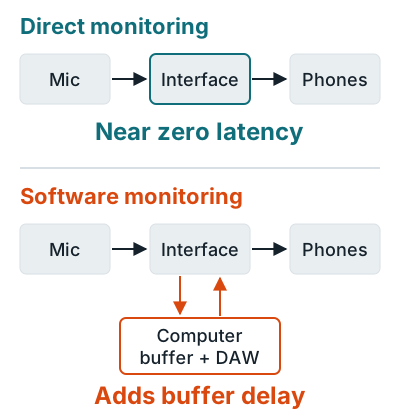
| Direct monitoring | Software monitoring | |
|---|---|---|
| Latency | Near zero | Buffer plus converter delay |
| Hear DAW plugins | No | Yes |
| Turn it on | Interface switch, knob or mixer app | Input monitor button on the DAW track |
Setup steps
- Pick one path, not both. Focusrite warns that running both paths at once gives an echo or phase issues, so mute the DAW track's input monitoring when direct monitoring is on.
- For software monitoring, drop the buffer. Apple's Logic Pro latency guide says to record at the lowest I/O buffer setting and go up one step only if you get overload alerts.
- Turn on low latency mode if your DAW has one. In Logic, choose Record > Low Latency Mode. It routes audio around plugins that add delay, such as look-ahead dynamics.
- Use wired headphones. Apple says Bluetooth adds latency. Go closed-back to keep the backing track out of the mic.
On the Scarlett Solo (1st to 3rd Gen), the Direct Monitor switch is mono only, per Focusrite's Solo guide. Headphone picks are on best closed-back studio headphones, with buffer and sample rate tradeoffs on sample rate and bit depth. The full process is in how to record music at home.
Related questions
Why do I hear an echo of my voice while recording?
You're hearing two copies: one from direct monitoring and a later one from the DAW. Turn off input monitoring on the DAW track, or turn off direct monitoring, so only one path reaches your headphones.
Can I use Bluetooth headphones to monitor vocals?
No. Apple's Logic Pro guide says Bluetooth devices add latency and should be kept for mixing or listening only.
How do I hear reverb on my voice while recording?
Use software monitoring with the reverb on the track at the lowest stable buffer, or an interface with onboard DSP such as Universal Audio's Apollo, which runs UAD plugins at near zero latency.
More answers: Home recording FAQ