How to Record Music at Home
To record music at home, plug a mic or guitar into an audio interface and record each part as its own track in a DAW at 48 kHz and 24-bit, with peaks around minus 12 dBFS. Then comp, mix, and bounce the song to a WAV file. A one-input interface, one mic, headphones, and free software are enough to start recording music.
The easiest way to record music at home
The easiest way is a USB mic, closed-back headphones, and a free DAW. A USB mic has the converter built in, so you don't need an interface. Audacity is free on Windows, macOS, and Linux, and Apple's GarageBand is a free Mac download with up to 255 tracks and multi-take recording.
Phone only
$0
Voice memos for song ideas. One track, no mixing.
USB mic
1 source
Vocals or one instrument at a time, straight into the DAW.
Interface + XLR mic
Mic + guitar
A mic and a guitar at once, and any mic you buy later.
The full shopping list is on what you need to record music at home. Phone, USB, and interface setups go head to head on the best way to record yourself at home.
How the signal chain works
Sound runs mic, preamp, converter, DAW, headphones. You set the level once, at the preamp gain knob. Everything after that can only turn the recorded signal up or down, and nothing downstream can undo clipping at the converter.
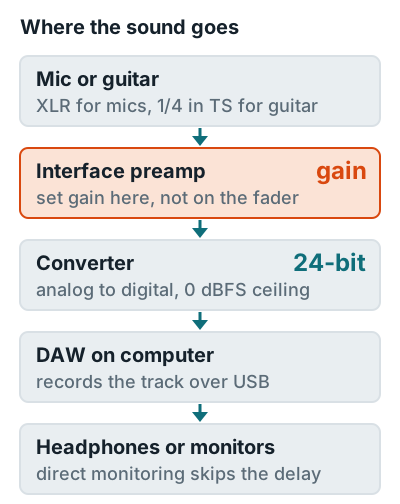
Use direct monitoring while you track. Focusrite's direct monitoring guide says it sends the input straight to your headphones with near-zero latency while the DAW still records it. Need an interface first? See what an audio interface does.
How to record a song, step by step
A home song goes through 8 stages, and the order matters. Scratch tracks come first, so every later part locks to the same tempo.
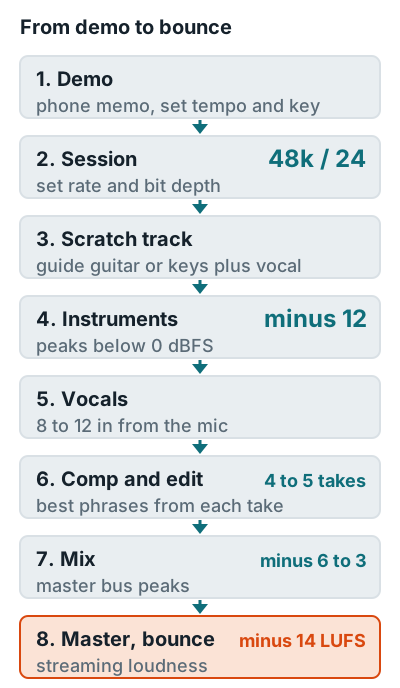
- Capture the demo. Record a phone memo of the whole song and write down the tempo and key, so the session starts with a click at the right speed.
- Set up the session. Create the project at 48 kHz and 24-bit before the first take. Apple's Logic Pro guide says not to change the project sample rate after audio is recorded. Details are in sample rate and bit depth.
- Record a scratch track. Play guitar or keys and sing the whole song to the click in one pass. It's a throwaway, but every other part follows it.
- Record the instruments. Set preamp gain so the loudest part peaks around minus 12 dBFS, the level Focusrite recommends for headroom. Guitar options are in how to record guitar on a computer, and drums in how to record drums at home.
- Record the vocals. Keep the singer 8 to 12 inches (20 to 30 cm) from the mic and leave about 10 dB of headroom above the loudest peak, per Neumann's home vocal guide. The full method is in how to record vocals at home.
- Comp and edit. Build one take from the best phrases of several. Audient suggests four or five takes per comp at most, and moving any cut that clips a breath to just before or after it.
- Mix. Avid's gain staging guide puts individual tracks at an average of minus 18 to minus 12 dBFS and the master fader peaking around minus 6 to minus 3 dBFS. Start the vocal with how to mix vocals.
- Master and bounce. Put a limiter last and export a WAV at the session rate. Spotify normalizes to minus 14 LUFS integrated and asks for true peaks below minus 1 dB.
A first home recording often goes wrong at step 4 or 5, not in the mix. Get the levels right on the way in and the rest gets a lot easier.
Settings to use before the first take
Four settings decide whether a recording is usable: sample rate, bit depth, input level, and buffer size. Set them once per project.
| Setting | Use | Why |
|---|---|---|
| Sample rate | 48 kHz | AES5 recommends it for audio production |
| Bit depth | 24-bit | 144 dB of range, so quiet parts stay clean |
| Recorded peaks | Around minus 12 dBFS | Focusrite's headroom target, so a louder take won't clip |
| Buffer size | 128 or 256 samples | Universal Audio's starting point for recording |
Recording guides by part
Each instrument and DAW gets its own recording page.
Vocals
Record vocals at home, vocal equipment, prepare for a session, how loud to record, loud vocals without clipping, mono or stereo, monitoring, how many tracks, backing vocals, fix a weak vocal, voice over.
Vocals in your DAW
FL Studio, GarageBand, Ableton Live, then mix the vocal.
Guitar and drums
Guitar on a computer, acoustic guitar, guitar and vocals together, guitar in FL Studio, drums at home.
Settings and workflow
Gain staging, sample rate and bit depth, producing music at home, recording yourself.
Room setup, gear, and acoustics live in the home recording studio guide.
FAQ
What is the easiest way to record music at home?
Plug a USB mic into your computer, put on closed-back headphones, and record into a free DAW such as GarageBand or Audacity. You skip the interface, and the only setting to get right is the input level.
Can I record a song with just my phone?
Yes, for song ideas and demos. For a release, record into a computer DAW so you can stack tracks, comp takes, and mix each part separately.
How long does it take to record a song at home?
It depends on how many parts you stack, so cap the takes. Audient suggests four or five takes per vocal comp, because the singer's energy drops on later passes.
What sample rate should I record music at?
Use 48 kHz and 24-bit. The AES5 standard recommends 48 kHz for audio production, and 24-bit gives a 144 dB range, so you can leave headroom without adding noise.
Should I mix and master my own song?
You can. Keep the master bus peaking around minus 6 to minus 3 dBFS while mixing, then master to about minus 14 LUFS with true peaks below minus 1 dBTP for streaming.
More answers: Home recording FAQ