Gain Staging for Home Recording
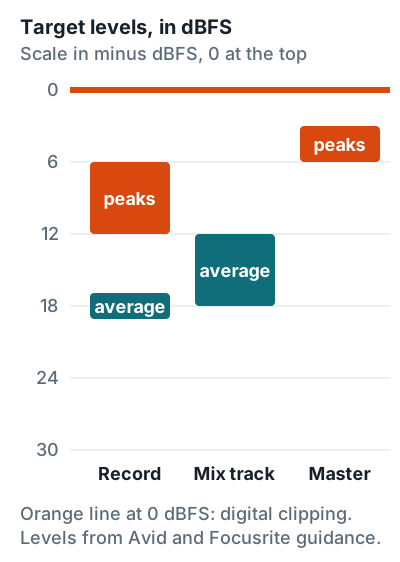
Gain staging is setting the level at each point in the signal chain so nothing clips and nothing sits so low it drags up noise. For home recording, that means recorded peaks between minus 12 and minus 6 dBFS, mix tracks averaging minus 18 to minus 12 dBFS, the master bus peaking at minus 6 to minus 3 dBFS, and a final limiter ceiling of minus 1 dBTP.
It sounds like engineer homework, but it's mostly one habit: leave room at the top.
Target levels at every stage
Each stage has one number to check on the meter. All of them sit below 0 dBFS, the hard ceiling where a digital signal clips.
| Stage | Meter | Target | Source |
|---|---|---|---|
| Recording, peaks | Sample peak | minus 12 to minus 6 dBFS | Focusrite (minus 12), Avid (minus 6 max) |
| Recording, average | RMS | about minus 18 dBFS | Avid |
| Mix, each track | RMS | minus 18 to minus 12 dBFS | Avid |
| Master bus before mastering | Peak | minus 6 to minus 3 dBFS | Avid |
| Final master | True peak | minus 1 dBTP or lower | Avid, Spotify |
The gain stages, in order
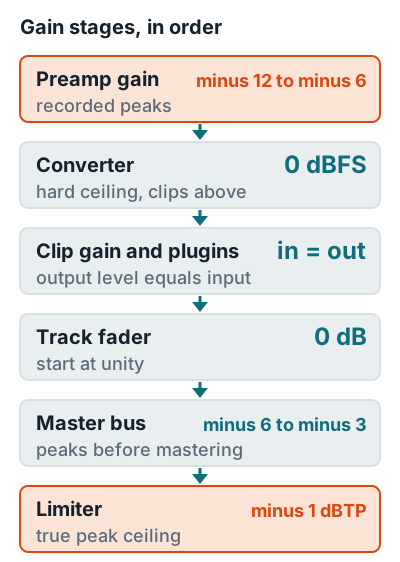
A home signal passes six gain stages. Get the level wrong at one and the mistake rides along into every stage after it.
Analog stages
Preamp
Clipping here is permanent. The converter can't record anything above 0 dBFS.
Digital stages
DAW
Clip gain, plugins, faders, and the master bus. Floating-point mixers like FL Studio's only clip at the output.
How to gain stage when recording
Set the level with the preamp gain knob on your interface, never the DAW fader. The fader only changes what you hear back, not what gets recorded. Avid's guide says to set input levels at the source and leave faders at unity during tracking.
- Turn the gain down first. Start at minimum, and switch on 48V phantom power, if the mic needs it, while the gain is down.
- Play the loudest part. Have the singer or player perform the chorus or hardest section, not the intro.
- Raise gain until peaks reach minus 12 dBFS. Focusrite recommends recording with peaks around minus 12 dBFS. On a Scarlett 2i2 4th Gen, the gain halo should stay green; amber means pre-clip and red means it clipped.
- Use a pad if minimum gain is still too hot. Avid says a pad typically cuts about 10 to 20 dB.
- Recheck after the first real take. Neumann notes singers sing louder in real takes than in the soundcheck, so leave the extra room.
Quiet dynamic mics often need gain near the top of the dial, and that's fine. Focusrite's article says it's normal, because many of its preamps add about 10 to 60 dB of gain on a non-linear knob. Vocal-specific numbers are on how loud should you record vocals, and fixes for hot singers are on how to record loud vocals without clipping.
How to gain stage when mixing
Set each track's level with clip gain or a trim plugin before any processing, then keep every plugin's output equal to its input. Avid's example: if a compressor takes off 3 dB, add 3 dB of make-up gain. This matters more than it sounds, because a plugin that just turns things up can fool you.
- Pull all faders down. Bring up the most important part first, usually the lead vocal or kick, so it averages minus 18 to minus 12 dBFS.
- Trim before plugins. Use clip gain so each track hits its first plugin at that same average, and save the faders for balancing.
- Match plugin output to input. After each EQ, compressor, or saturator, compare levels with it on and off and set the output so the level stays the same.
- Watch the master bus. Keep peaks at minus 6 to minus 3 dBFS. If it runs hot, pull all the track faders down together, not the master fader.
- Leave the ceiling to the limiter. In mastering, set the limiter ceiling to minus 1 dBTP. Avid gives minus 14 to minus 16 LUFS as the streaming target, and Spotify asks for true peaks below minus 1 dB.
Track meters going over 0 dB inside the mixer usually aren't clipping, so don't panic. FL Studio's manual says its mixer runs in 32-bit floating point, so insert tracks won't run out of headroom, but the Master output must stay below 0 dB.
Why minus 18 dBFS
Minus 18 dBFS is the digital level that lines up with 0 VU on analog gear. Avid's guide says an RMS level of minus 18 dBFS corresponds roughly to 0 VU, and EBU R68 sets the digital alignment level 18 dB below the maximum coding level.
Averaging minus 18 with peaks at minus 6 leaves 12 dB between the typical level and the loudest hit, and 6 dB more before clipping. That's a lot of safety. The full song workflow is in how to record music at home.
FAQ
What is minus 18 dBFS in gain staging?
Minus 18 dBFS is the average level many engineers aim for, because Avid notes it roughly matches 0 VU on analog gear. EBU R68 also sets the digital alignment level 18 dB below full scale.
Do I need to gain stage in a 32-bit float DAW?
Inside the mixer, less so: FL Studio's manual says its 32-bit float tracks won't run out of headroom in practice. You still need to set preamp gain, and the master output must stay below 0 dBFS.
Should I gain stage with the fader or the clip gain?
Use clip gain or a trim plugin to set the level going into plugins, and leave the fader for balancing the mix. Avid's guide also says to leave faders at unity while recording.
Is it bad if a track meter goes red?
On the input, yes: red on the interface or recorded track means the converter clipped, so turn the gain down and record again. On a floating-point insert track it's harmless, but red on the master output means clipping.