Can You Put Studio Monitors on Their Side?
You can put studio monitors on their side only if they're coaxial or the manual allows it. Standard two-way monitors should stand upright. Yamaha's HS manual says its monitors "should be used vertically, not laid on their side," and Genelec's orientation note says horizontal placement "causes a notch at the crossover when moving to the side."
What happens when you lay a monitor sideways
Laying a two-way monitor on its side puts the tweeter and woofer side by side, so Genelec says you hear a notch at the crossover as you move to the side, plus stronger desk reflections.
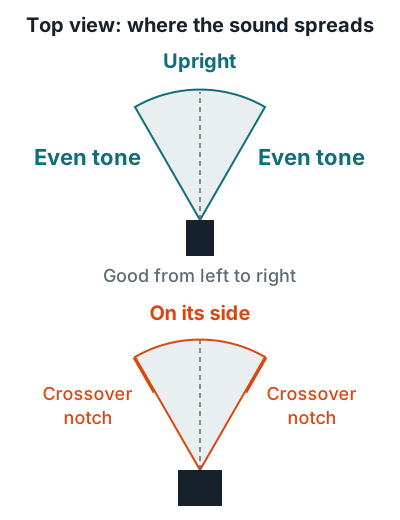
Genelec measured a horizontal two-way monitor on a large desk with comb filtering from 1 kHz up to 7 kHz, and a flatter response once it stood upright. Upright placement also increases the distance and angle of the desk bounce, cutting coloration usually between 1 and 2 kHz.
| Design | Sideways OK? | Example |
|---|---|---|
| Two-way, tweeter above woofer | No, unless the manual allows it | Yamaha HS series |
| Coaxial, tweeter in the woofer's center | Yes | Genelec The Ones |
Better fixes for a low shelf or tall desk
- Use stands behind the desk. Genelec recommends stands high enough that the desk doesn't block the woofer.
- Tilt them at your ears. Genelec's 8030C manual says to aim the acoustic axes at the listening position, converging at ear height.
- Keep the triangle. Angle each monitor 30 degrees in, as shown in how to set up studio monitors.
If you're short on space, compact picks are in the best studio monitors for home studios.
Related questions
Can I put my studio monitors sideways to fit under a shelf?
Not if they're two-way, tweeter-over-woofer models. Use smaller monitors or stands instead, and tilt them so the tweeter points at your ears.
Which studio monitors can lie on their side?
Coaxial designs, where the tweeter sits in the center of the woofer. Genelec says its coaxial The Ones models work in either orientation.
More answers: Home recording FAQ