How to Record Vocals in FL Studio
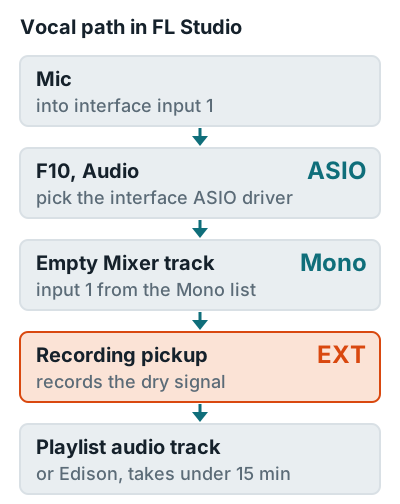
To record vocals in FL Studio, select your interface's ASIO driver, route the mic input to an empty Mixer track from the Mono list, and set the recording pickup to EXT. Then arm the track and record into the Playlist. One catch: you need Producer Edition or higher, because Image-Line's edition comparison lists audio recording as "Producer Edition and up."
Getting a vocal on top of your beat is quick once you know where things live. Two spots to get right: the Mono list and the pickup selector.
Which FL Studio editions can record vocals
Producer Edition, Signature Bundle, and All Plugins Edition can record vocals. Fruity Edition can't record any external audio, no matter what you plug in. The free trial records too, but it can't reopen saved projects.
| Edition | Records vocals? | Note |
|---|---|---|
| Fruity Edition | No | No audio recording |
| Producer Edition | Yes | Cheapest edition that records |
| Signature Bundle | Yes | Adds more plugins |
| All Plugins Edition | Yes | Every Image-Line plugin |
| Free trial | Yes | Projects can't be reopened until you buy |
Image-Line's product page says buying an edition gets you free updates to future releases of that edition, so you pay once for that edition.
Steps to record a vocal
You need a mic, an audio interface, and closed-back headphones, so the beat doesn't bleed into the vocal. Every menu name below comes from Image-Line's recording manual.
- Pick the driver. Press F10, open Audio, and choose your interface's own ASIO driver (Windows). The manual says the FL Studio ASIO driver works but can add latency. On macOS 10.14 (Mojave) or later, FL Studio also needs permission to use your microphone.
- Turn on audio recording. Right-click the Record button on the transport and make sure Audio is checked.
- Choose an empty Mixer track. Never the Master, which carries every other Mixer track (your whole beat included).
- Select the input. Open the track's Input menu and pick your mic input from the lower Mono list. Selecting an input also arms the track.
- Set the pickup to EXT. Click the selector in front of the Input menu and choose External input only (EXT) for a dry take you can process later.
- Link it to the Playlist. Right-click the Mixer track and choose Assign to new audio track(s).
- Set your level. Sing the loudest line and raise interface gain until peaks reach about minus 12 dBFS. Targets are on how loud to record vocals.
- Record. Click Record so it lights up, press Play, sing, then press Stop. For several takes, turn on Loop record and turn off Blend record.
Want the shortcut? Click the mic icon in the toolbar and choose "into playlist as an audio clip." FL Studio creates an audio track, opens the input selector, and records after a 4-click count-in.
Mixer routing for vocals
Two settings on the Mixer track do two different jobs. The recording pickup decides what goes into the file, and Monitor external input decides what you hear. Set them separately.
| Pickup | What gets recorded | Use for |
|---|---|---|
| EXT | Raw input, no FL Studio effects | Every vocal take |
| MIX, FX, EQ, LVL, POST | Input plus the track's effects or mixer settings | Only when you want effects printed for good |
The manual warns that effects recorded with the non-EXT pickups can't be removed afterward. Baking reverb into a take feels great until the mix, when you can't turn it down. Keep reverb and EQ on the track for monitoring, record on EXT, then mix with how to mix vocals.
Playlist or Edison
Record full takes to the Playlist and quick ad-libs or short phrases to Edison. Edison records into RAM at about 20 MB per minute, and the manual recommends the Playlist for anything over about 15 minutes.
Playlist (disk)
Full takes
Assign to new audio track, press Record, then Play. Best for many takes and long songs.
Edison (RAM)
Short lines
Shift+E loads Edison in the first empty FX slot; leave the slots above it empty for a dry take. Shift+C sends it to the Playlist.
Fix latency and timing
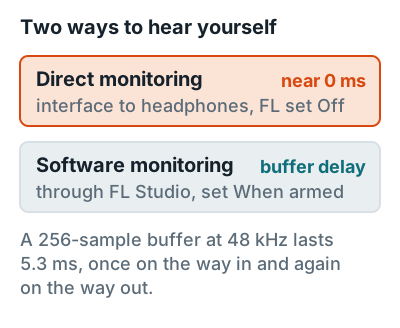
To hear yourself without delay, turn on your interface's direct monitoring and set FL Studio's Monitor external input to Off. The manual recommends direct monitoring wherever your interface supports it, because it avoids the latency echo that makes it hard to stay in the pocket.
To make takes land on the grid, open the Mixer menu, go to Disk Recording, and turn on Latency compensation, which trims the device latency from the start of each recording. More monitoring setups are on how to monitor vocals while recording.
No interface yet
Guitar next
How to record guitar in FL Studio uses the same routing.
Whole song
How to record music at home, demo to bounce.
FAQ
Can you record vocals on FL Studio Fruity Edition?
No. Image-Line's edition comparison lists audio recording as Producer Edition and up, so Fruity Edition can't record a microphone. Upgrading to Producer Edition adds audio recording.
Why does my vocal only play in one speaker in FL Studio?
You picked a stereo input pair with the mic on one side. Choose the mic's input from the lower Mono list in the Mixer track's Input menu so both channels get the signal.
Can I record vocals in the FL Studio trial?
Yes. Image-Line says the trial includes every feature with no time limit, and you can export full-quality WAV or MP3, but you can't reopen a saved project until you buy an edition.
Why is there a delay when I hear myself in FL Studio?
You're monitoring through FL Studio, which adds buffer latency. Turn on your interface's direct monitoring and set Monitor external input to Off.
Where does FL Studio save vocal recordings?
To the folder you chose, or to the default Recorded folder inside your FL Studio Audio data location. With Auto-create audio clip on, the take also appears in the Playlist.
More answers: Home recording FAQ