Why Do I Need an Audio Interface?
You need an audio interface to record an XLR mic, to plug a guitar or bass in directly, or to record two or more sources at once. If you only record one voice, a USB mic does the job on its own, because the preamp and converter are built in.
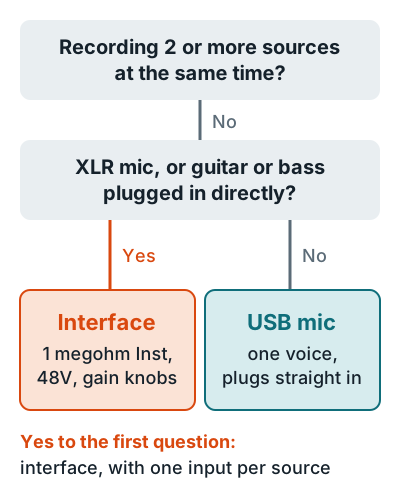
An XLR mic needs gain. Shure puts mic level at 1 to 10 millivolts, about 1,000 times below line level, per its guide to mic and line level. An interface supplies that gain, plus 48V phantom power for condensers and a 1 megohm instrument input for guitar on a model like the Scarlett 2i2 4th Gen.
| You record | USB mic | Audio interface |
|---|---|---|
| One voice, podcast or voice over | Yes | Yes |
| XLR mic | No | Yes |
| Guitar or bass direct | No | Yes |
| Vocal and guitar at once | No | Yes |
| Feeding studio monitors | No | Yes |
A USB mic with a headphone jack, like the Shure MV7+, also gives you latency-free monitoring, the other job an interface does. Weigh the two in are USB mics good for recording vocals, learn what an audio interface is, or compare picks on the best audio interface for home recording page.
Related questions
Do I need an audio interface to record vocals?
Only with an XLR mic. A USB mic has its own preamp and converter, so it records vocals straight into your computer.
Is it worth getting an audio interface?
Yes, if you'll ever add a second mic, a guitar, or studio monitors. A 2-input interface such as the Scarlett 2i2 covers all three, where a USB mic covers only one voice.
Can I plug an XLR mic straight into my computer?
Not without a preamp. Mic level is 1 to 10 millivolts, about 1,000 times weaker than line level, so it needs an interface or an XLR to USB adapter; see using an XLR mic without an interface.
More answers: Home recording FAQ