How to Connect Studio Monitors to a Computer
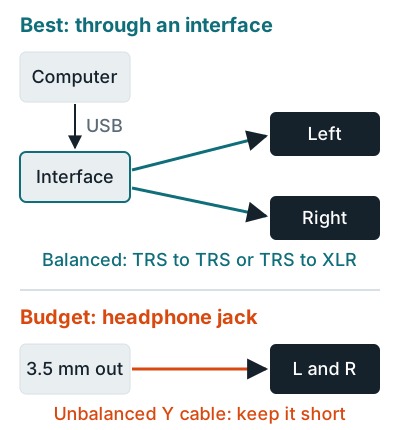
To connect studio monitors to a computer, plug an audio interface into it over USB, then run one balanced cable from each interface line output to each monitor. The Focusrite Scarlett 2i2 4th Gen guide calls for balanced 1/4 inch TRS cables from its outputs to active monitors.
Which cable you need
Match the plug on your interface or computer to the input on your monitor.
| Your output | Monitor input | Cable |
|---|---|---|
| Interface 1/4 inch TRS (balanced) | 1/4 inch TRS | TRS to TRS, one per side |
| Interface 1/4 inch TRS (balanced) | XLR | TRS to male XLR, one per side |
| Computer 3.5 mm headphone jack | 1/4 inch | 3.5 mm stereo to dual 1/4 inch TS (unbalanced) |
| RCA output (TV, DJ gear) | XLR only | RCA to male XLR adapter (unbalanced) |
| Computer USB | USB-C monitor (ADAM D3V) | USB-C cable |
Yamaha HS monitors take XLR or balanced 1/4 inch, per the HS manual. Neumann's KH 120 II manual recommends a balanced cable (XLR to XLR or jack to XLR), and for unbalanced RCA, an XLR adapter at the source end.
Hookup steps
- Turn everything down. Set the interface's Output knob and each monitor's level control to minimum, as Focusrite's guide advises.
- Connect the interface to the computer. Use the USB-C port. Drivers and settings are covered in how to connect an audio interface to a computer.
- Cable outputs 1 and 2 to the left and right monitors.
- Power on the monitors last. The Yamaha manual says sources go on first and speakers last, and speakers go off first.
- Set the interface as the output device in your computer's sound settings and your DAW, then bring the level up slowly.
Placement is next: see how to set up studio monitors. Picks are in the best studio monitors for home studios.
Related questions
Can I connect studio monitors to a PC without an audio interface?
Yes. Run a 3.5 mm to dual 1/4 inch TS cable from the headphone jack, kept to about 3.3 to 6.6 feet (1 to 2 meters) since it's unbalanced, or pick a USB monitor such as the ADAM Audio D3V.
Do I need one cable or two?
Two for a standard pair, one per powered monitor. A USB desktop pair like the ADAM D3V uses one USB-C cable plus the connection cable in the box.
Can I use TRS and XLR inputs at the same time?
Not on Yamaha HS monitors. The manual says the XLR and phone jack inputs can't be used simultaneously.
More answers: Home recording FAQ